Amazon DSP software that covers everything.Nine portals. No add-ons.
Nine portals, a free driver app, and features built for three things only: profit, Scorecard and efficiency.
Financial Management
The problem1. You find out you lost money three weeks after you lost it.2. The Amazon invoice is accepted as sent. Nobody checks a line.3. You find out at the end of the week that you ran too many rescues, or too much overtime.
The fix1. Profit Projection shows today's profit or loss tonight, per route.2. Invoice Validation checks every billed line against the week you ran, and drafts the dispute with the dollars owed.3. Rescues and overtime show the same day: unpaid rescues on Work Summary, overtime share on Profit Projection.
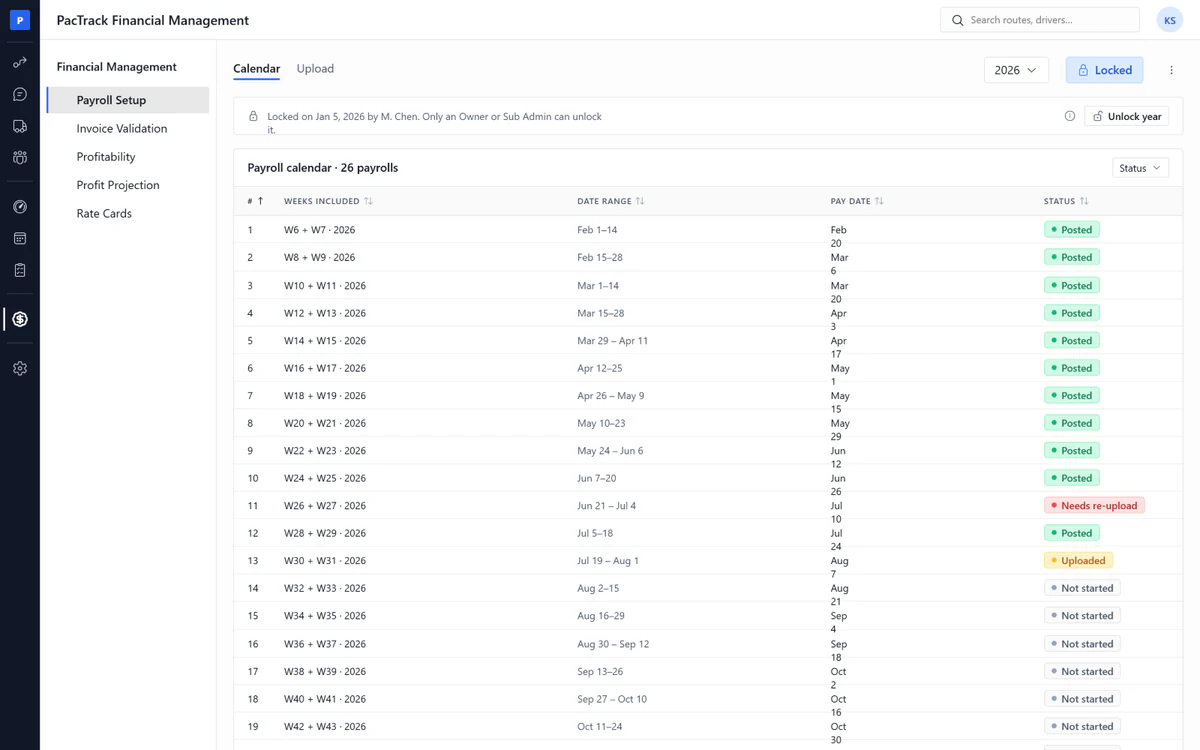
Payroll Setup
- ✓Pay calendar: Every finance page reads the same pay weeks
- ✓Paycom payroll intake: Upload the payroll file, check it, post it
- ✓Biweekly periods: 26 periods a year from one start date
- ✓Amazon week labels: Sunday to Saturday, Amazon's real week numbers
- ✓Locked once confirmed: Only the owner can unlock, and it is logged
- ✓Manual entry: Type the numbers when there is no file
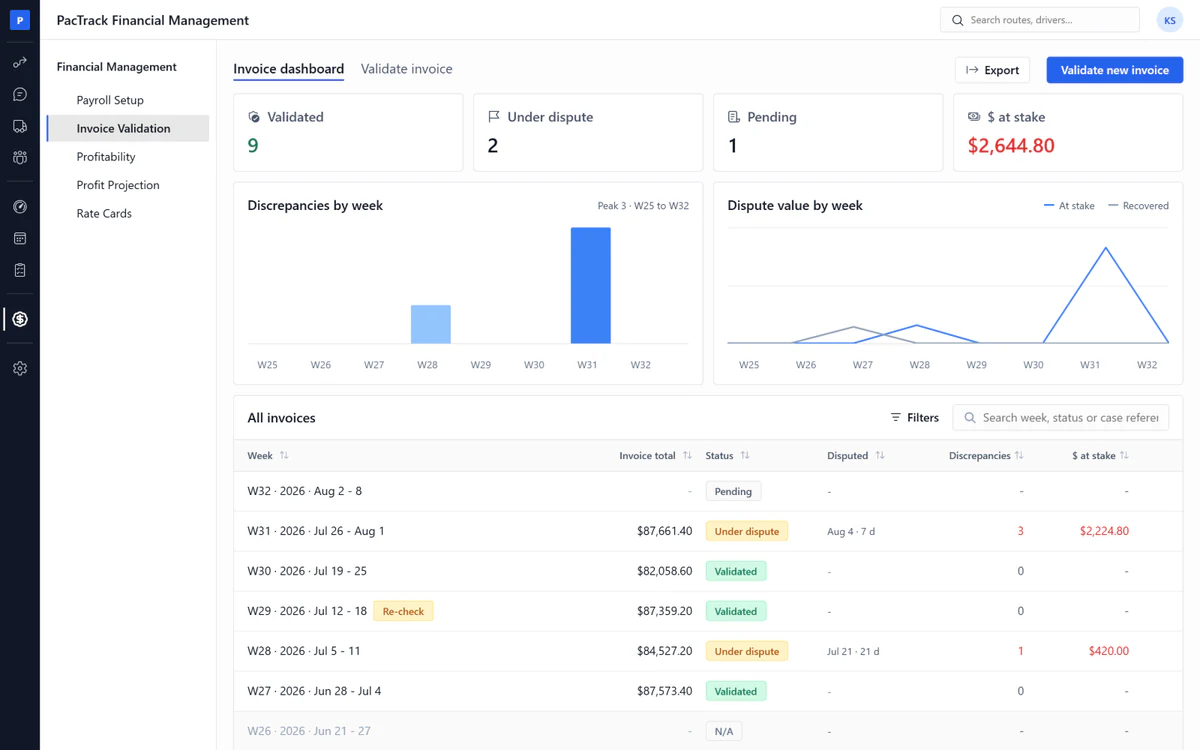
Invoice Validation
- ✓Invoice validation: Every line Amazon billed is checked
- ✓Dispute document: Written for you, with the dollars Amazon owes
- ✓Route and rescue lines: Each route type checked against the week you ran
- ✓Rate match: The billed rate checked against the rate in force that week
- ✓Package lines: Billed packages checked against delivered
- ✓Validate or dispute: One decision, and the system recommends one
- ✓Frozen at decision: A later edit flags the week, never rewrites it
- ✓Invoice dashboard: Every week as pending, validated or under dispute
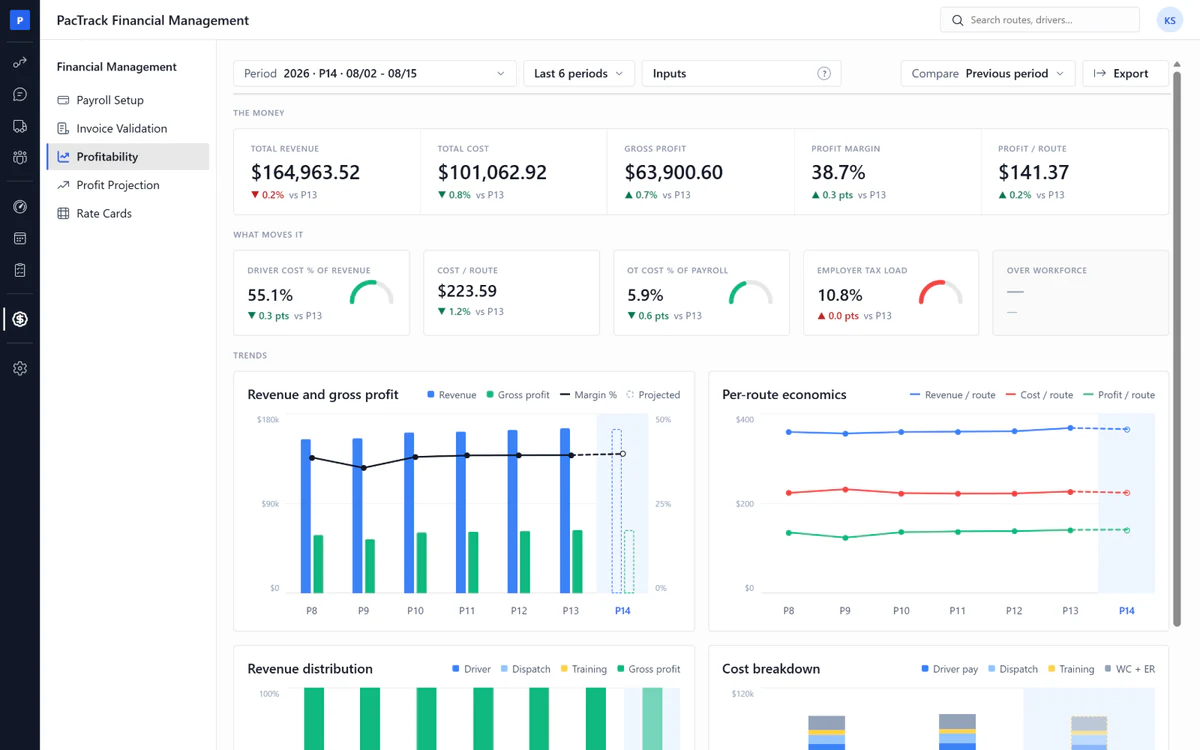
Profitability
- ✓Pay-period profit: Gross profit and margin for each two-week period
- ✓Live projection: The current period, projected as the inputs arrive
- ✓Profit per route: What each route made you
- ✓Driver, dispatch, training: Payroll cost split three ways
- ✓Inputs status: Each number marked real, filled or provisional
- ✓Period compare: This period against the last one
Profit Projection
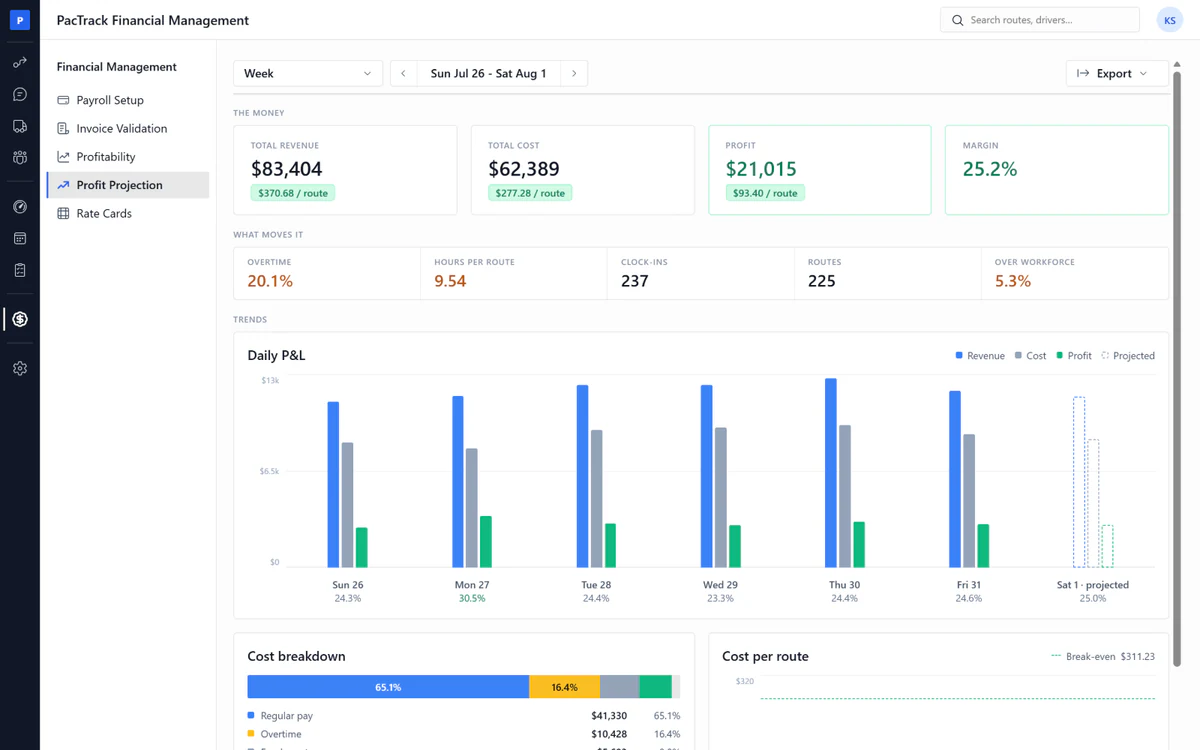
- ✓Daily profit projection: Tonight's P&L for today's routes
- ✓Overtime share: How much of payroll was overtime
- ✓Projected, actual, locked: Estimated first, real when the file lands, then frozen
- ✓Revenue: Routes and packages at the rate in force that day
- ✓Payroll cost: Every person, every day, from the payroll file
- ✓Cost per route: Today's cost against a break-even target
- ✓Per-driver rates: Each driver's real hourly rate, no flat guess
- ✓Adjustments: The dispatcher incentive worked out by formula
Rate Cards
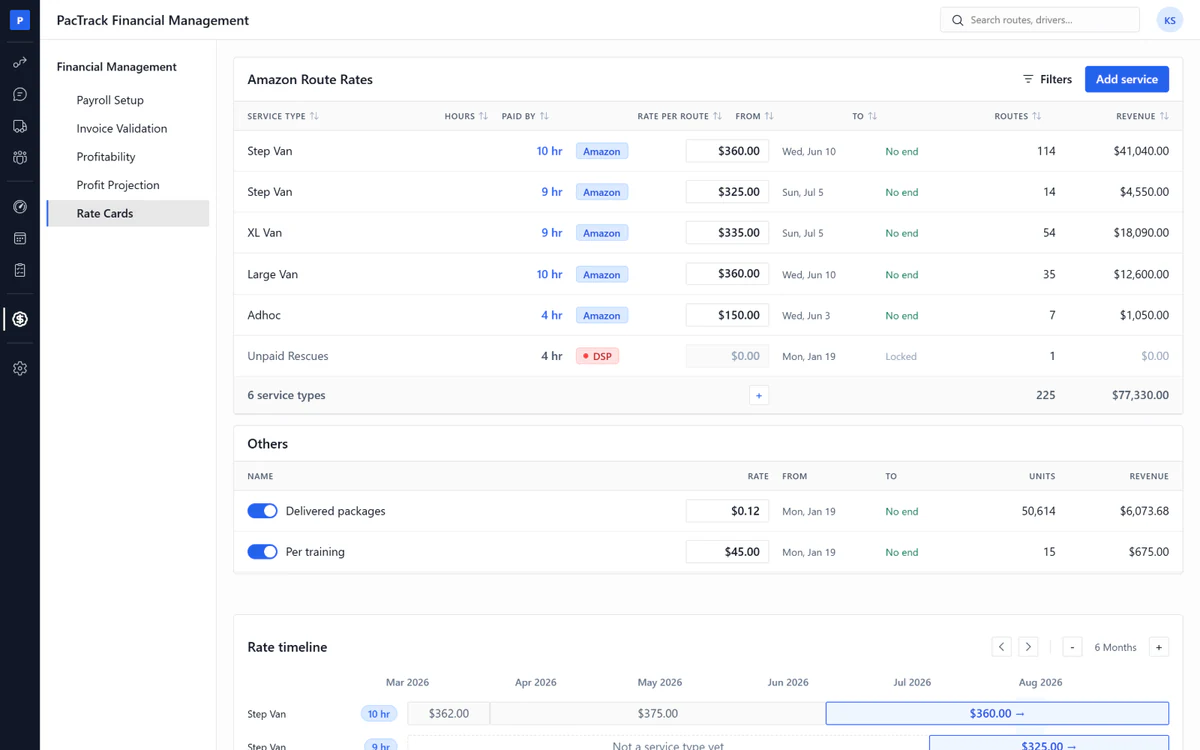
- ✓Rate cards: Every rate has a start day and an end day
- ✓Per service type and hours: A 9-hour and a 10-hour route are two rates
- ✓Carry forward: A rate stays until you change it
- ✓Package rate: Per delivered package, on or off, dated
- ✓Rate history: Which rate applied on which day
- ✓Locked days: A closed day is never re-priced
Scorecard & Coaching
The problem1. A text saying "watch your following distance" is not coaching. Nobody knows if it was read.2. Every week below Fantastic+ is Amazon money you did not collect.3. Bad drivers keep working, and keep draining you.
The fix1. Every event assigns a video and a quiz, and the driver acknowledges it on their phone.2. Overdue coaching blocks the next shift, so you get Fantastic+ and High Performing DSP status. Only drivers who are good, or want to get good, keep working for you. Guarantee included.3. The acknowledgment is the record, kept on the driver's file with the date and time.
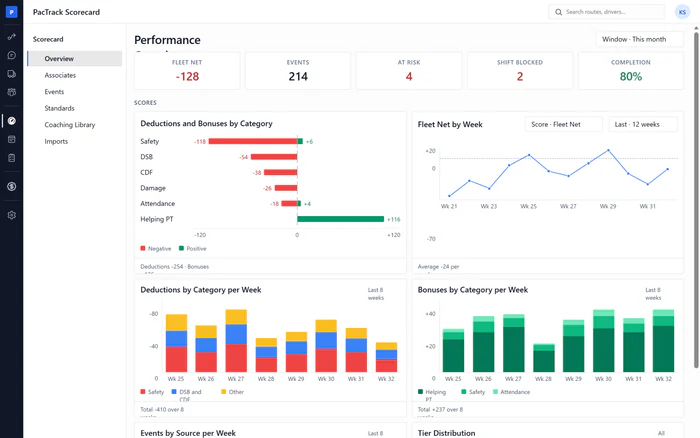
Overview
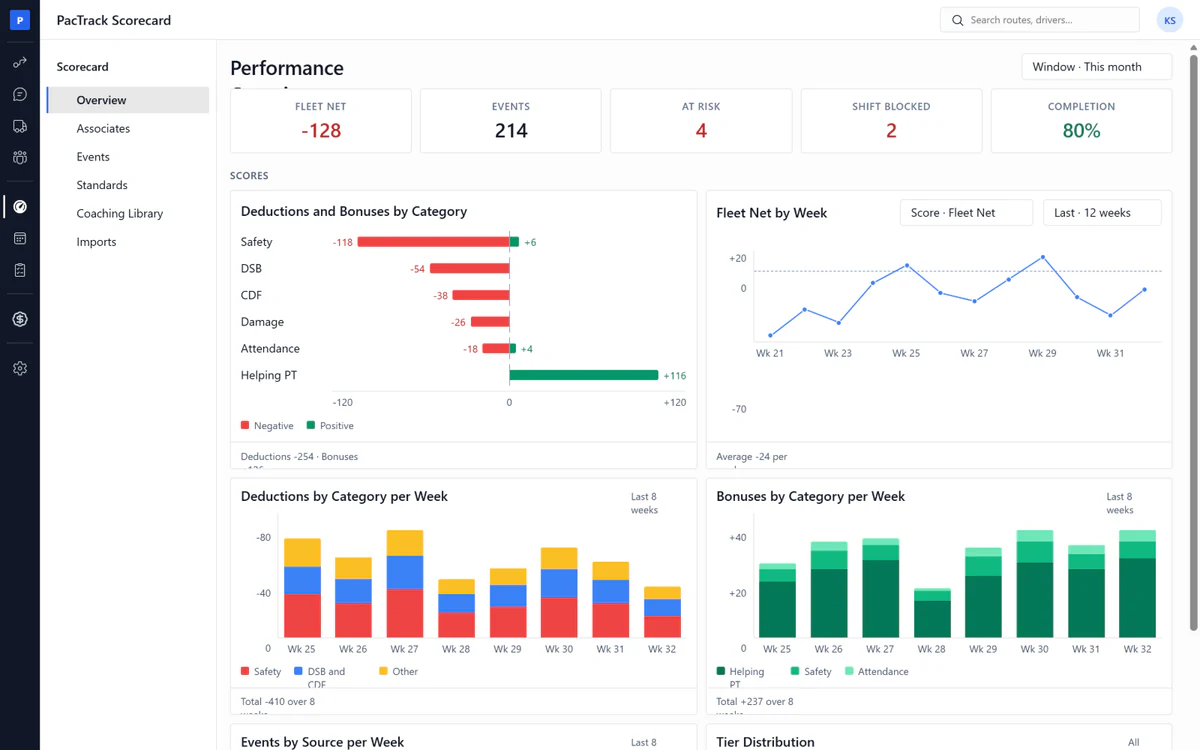
- ✓At-risk and blocked: Live counts of who is at risk and who is blocked
- ✓Coaching automation health: Exact numbers of coaching created, completed and overdue
- ✓Repeat rate: Same driver, same event, within 30 days
- ✓Associate net score: The whole team's score in one number
- ✓Deductions by category: See where the points are being lost
- ✓Leaderboard: Top 3 drivers, with promotion readiness
- ✓Kudos and declines: Biggest movers up and down, act from the row
- ✓Window: Today, last week, this month or any dates
Associates
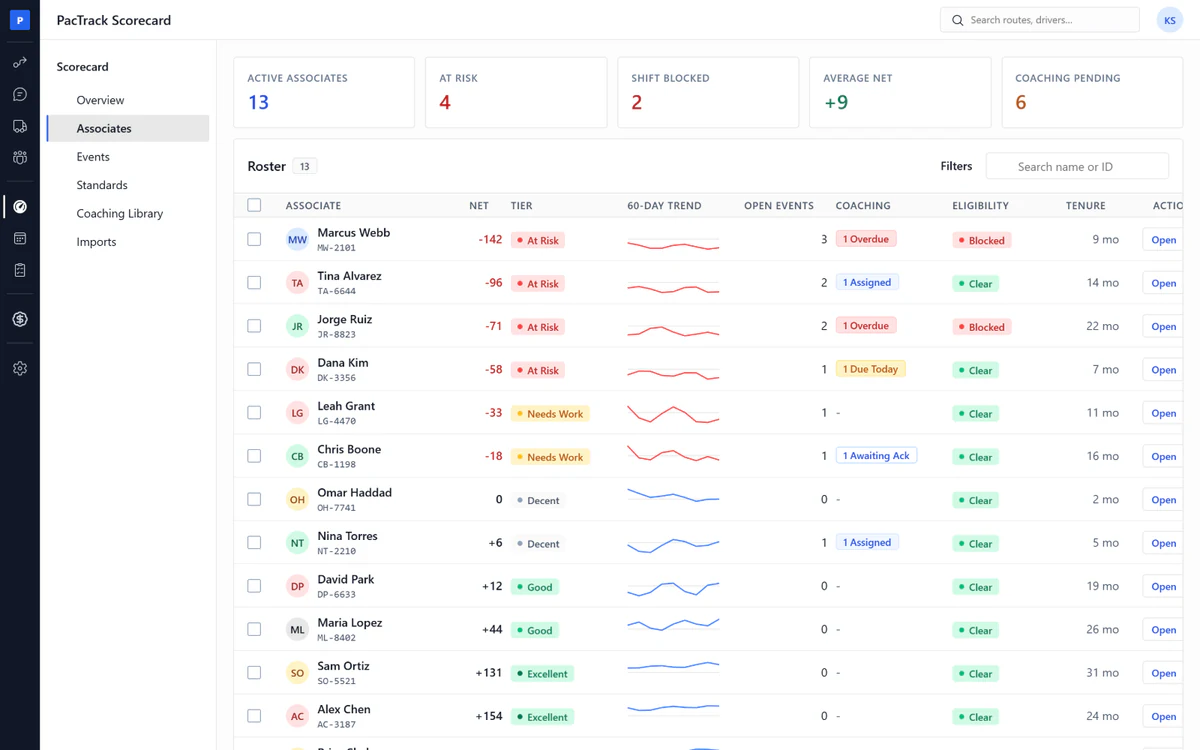
- ✓Eligibility: Every driver shows clear, blocked or inactive, live
- ✓Acknowledgment record: The driver's name and time on every finished module
- ✓Bulk assign coaching: Send one module to many drivers at once
- ✓At-risk list: Worst driver first, by net score
- ✓Score trend: Every event and every coaching on one line per driver
- ✓Promotion readiness: Four checks, ticked live
- ✓Kudos: Praise the driver sees on their phone
- ✓Export: The driver's performance record as Excel or PDF
Events
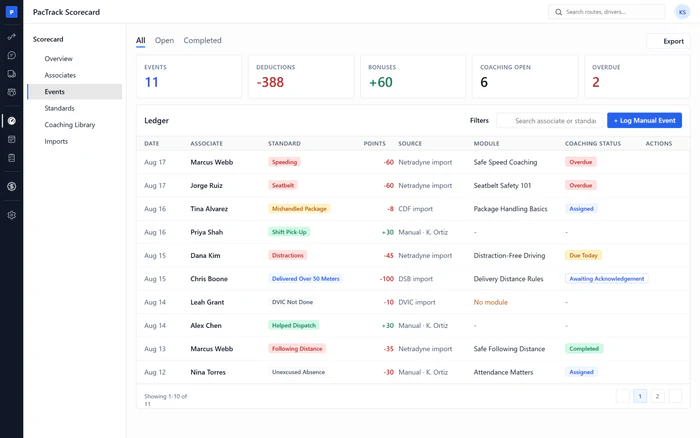
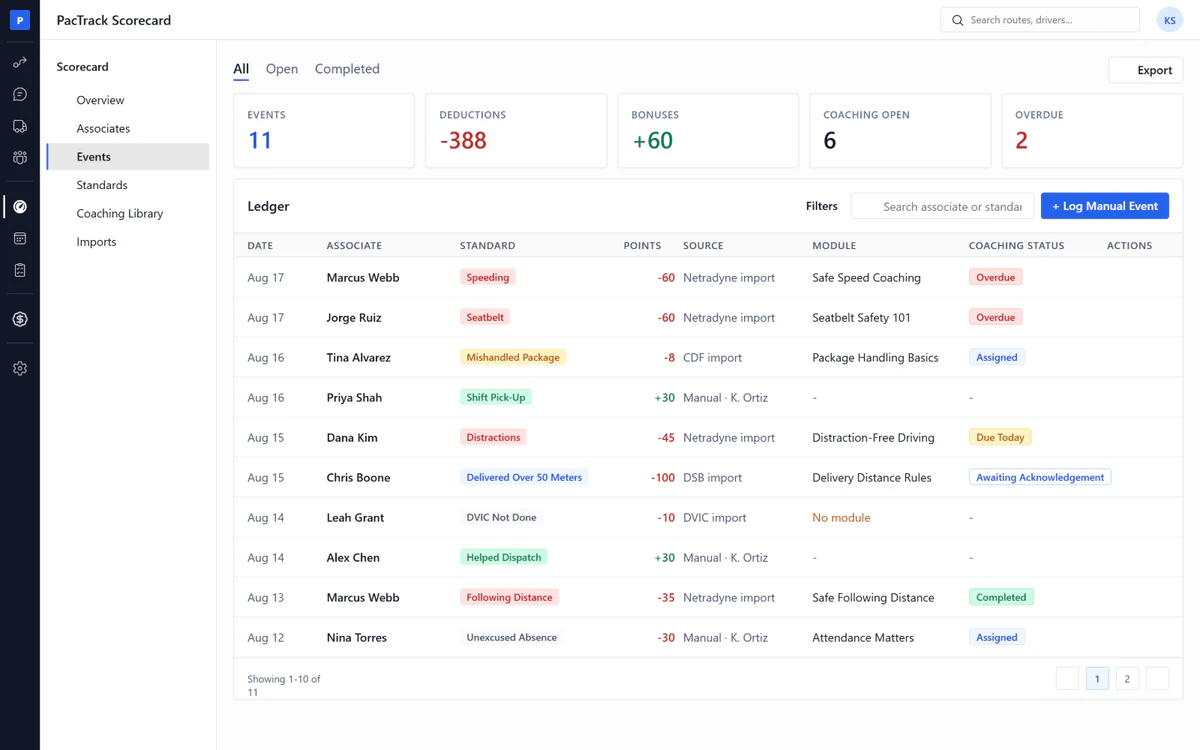
- ✓Shift block: See exactly who is blocked from the next shift
- ✓Chase list: Every open coaching, overdue ones first
- ✓Bulk remind: One click texts every overdue driver
- ✓Completed tab: Days to complete and quiz score per driver
- ✓One ledger: Every event, imported or logged by hand, with its points
- ✓Log by hand: You pick the standard, the points fill in themselves
- ✓Void with audit: Points removed, the row stays with who did it
- ✓Export: Any tab as CSV
Standards
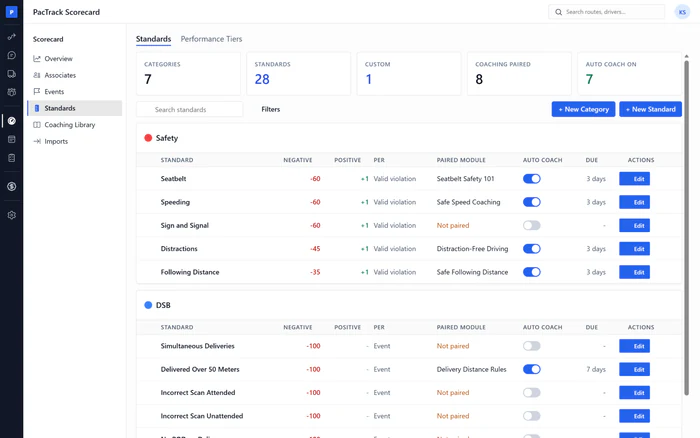
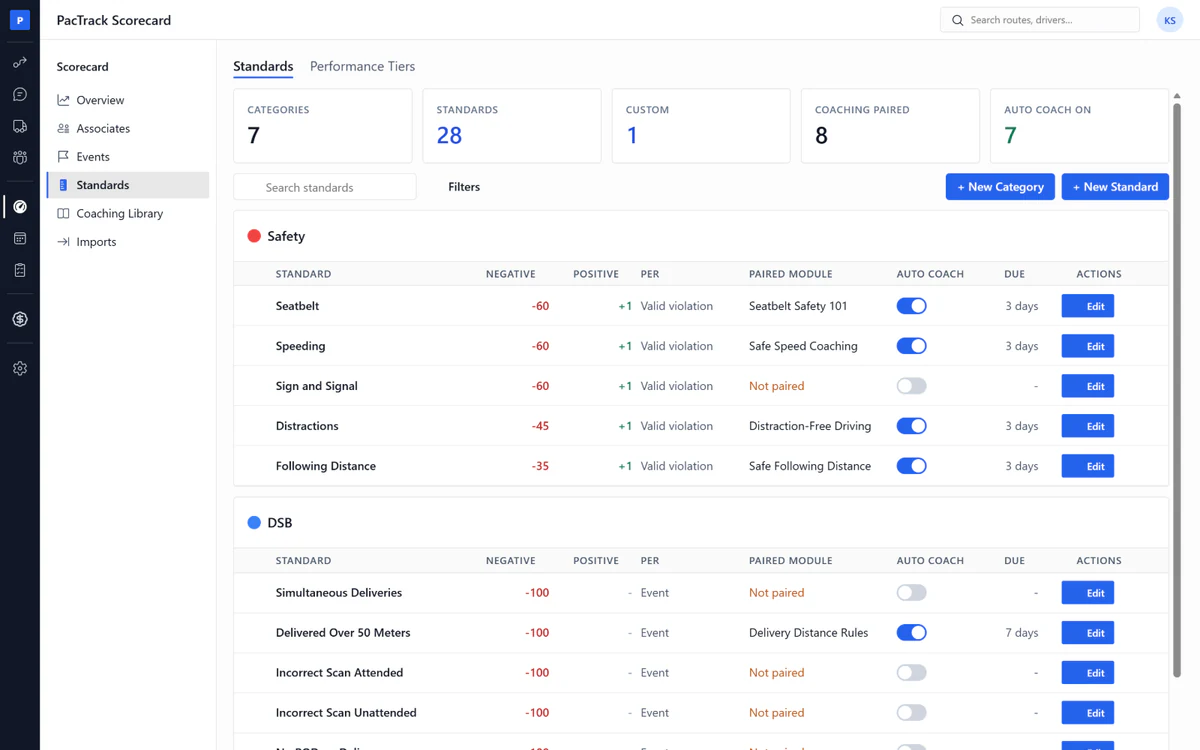
- ✓Coaching pairing: Each standard gets a module and days to finish it
- ✓Auto coach: Every negative event assigns the module by itself
- ✓Custom standards: Amazon's rules plus your own rules
- ✓Points both ways: Minus points for breaking a rule, plus for keeping it
- ✓Performance tiers: Your own named bands, like Excellent, Good, At Risk
- ✓At-risk flag: You choose which tier counts as at risk
- ✓Built-ins preloaded: Safety, DSB, CDF, DVIC, Work Ethics, Helping PT
- ✓Edit history: Every point change, who changed it and when
Coaching Library
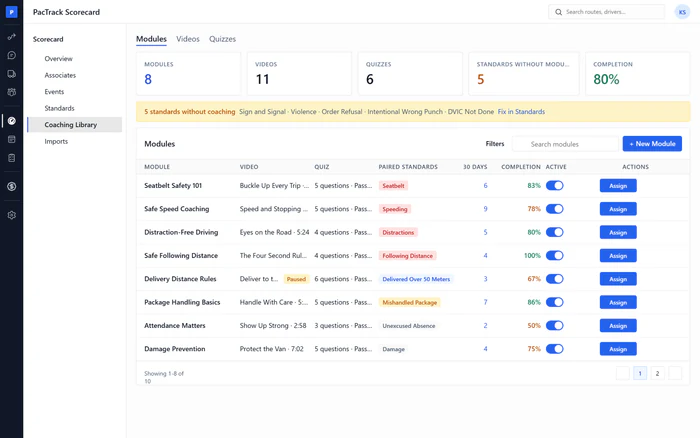
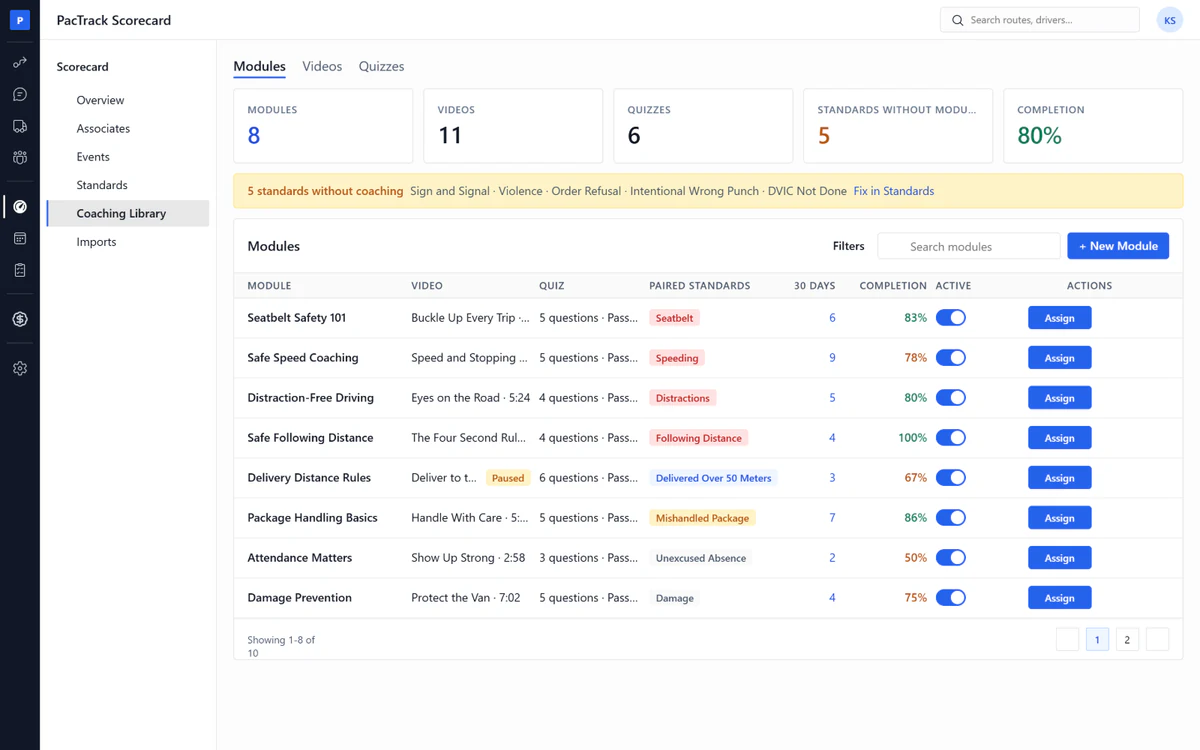
- ✓Video coaching with a quiz: One video and one quiz per module
- ✓Acknowledgment: The driver taps to confirm, and the module closes
- ✓Statement per module: The exact words the driver confirms
- ✓Quiz Maker: Write your own questions, set your own pass mark
- ✓Video library: Upload or link a video once, use it in any module
- ✓Assign from here: Any module to any driver
- ✓Coverage banner: Standards that still have no coaching module
- ✓Completion rate: Finished versus assigned, last 30 days, per module
Imports
- ✓Points stamped on import: Coaching is assigned the same second
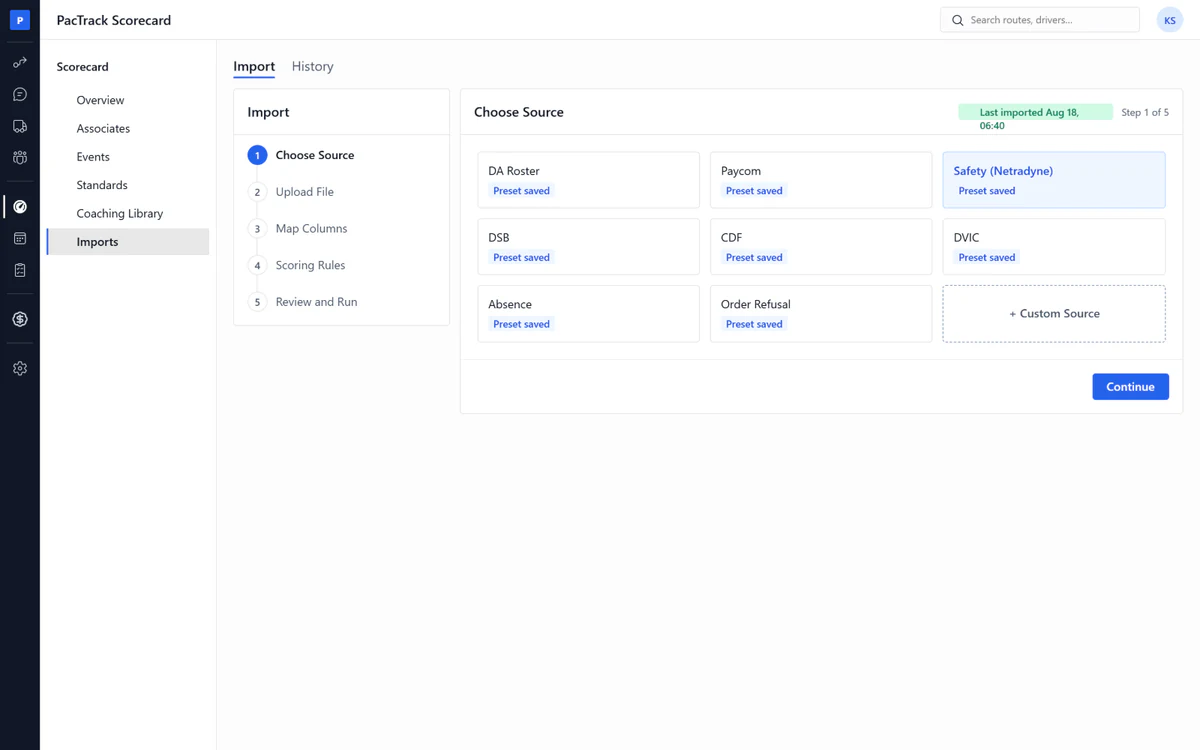
- ✓Scorecard import: One wizard, one saved preset per file type
- ✓Netradyne, DSB, CDF, DVIC: Presets ready before your first file
- ✓Issues before the run: Fix unmatched drivers and unknown values first
- ✓Remembered matches: Fix a name once, next week is one click
- ✓Roster import: Driver names, IDs and start dates from one file
- ✓Roll back a batch: Bad file? Events voided, coaching cancelled
- ✓History: Every batch and every skipped row, kept
Dispatch
The problem1. There is a tool for load out. Nothing for the rest of the day. Nothing for the close.2. So nobody sees who is behind at 2pm, or counts what comes back at night.3. One callout costs a route. Standbys cost money.
The fix1. On Road and Return to Station are portals of their own. On-road reminders go out from them.2. Return to Station closes the night. Every package counted, so none becomes a concession.3. A callout is covered from the standby bench or the on-call list, the people you call in when you need them.
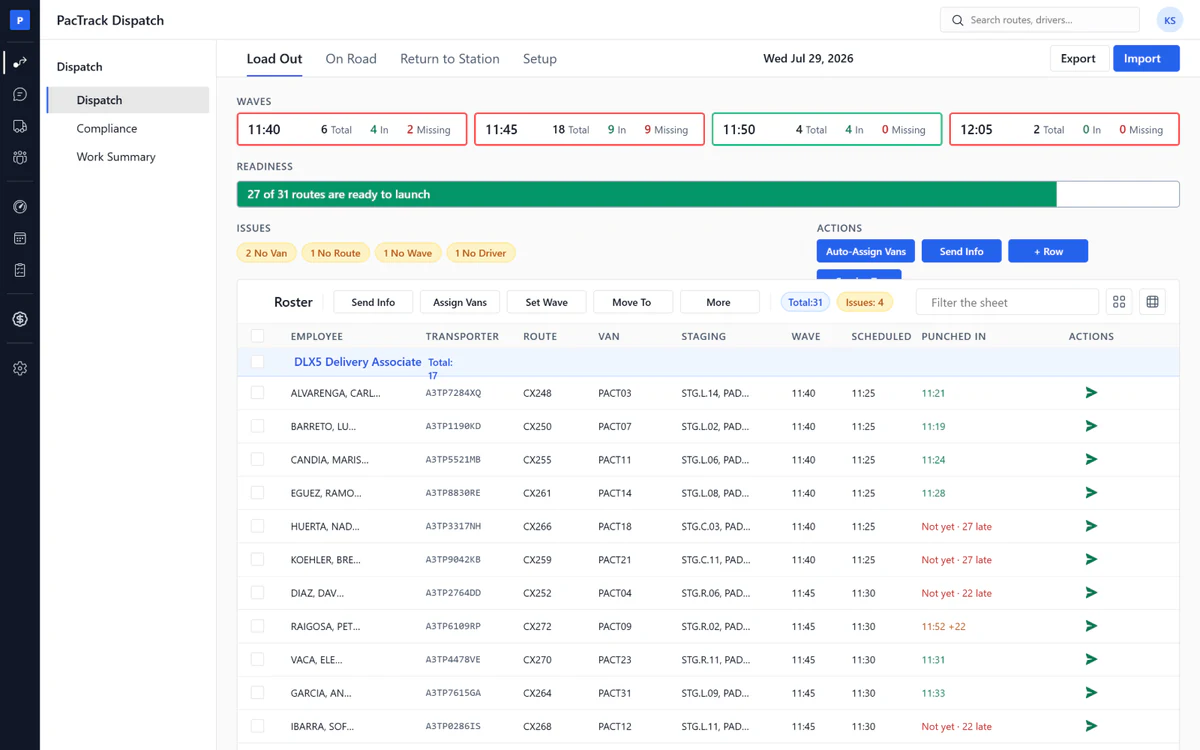
Load Out
- ✓On-call driver list: Who you called, who is coming, who has arrived
- ✓Bench swaps: Standby, On Call and Called Out lists, swap in one click
- ✓Live wave strip: Each wave colored by how many drivers are missing
- ✓Punch-in compliance: Who has punched in, who is late, who is short
- ✓Real-time punch feed: Punches come in from Paycom or ADP as they happen
- ✓Auto van assign: Every driver gets a van from that van's ranked list
- ✓Send Info: One text to every driver, nobody gets it twice
- ✓Amazon file import: Load the Amazon file once, waves and times fill in
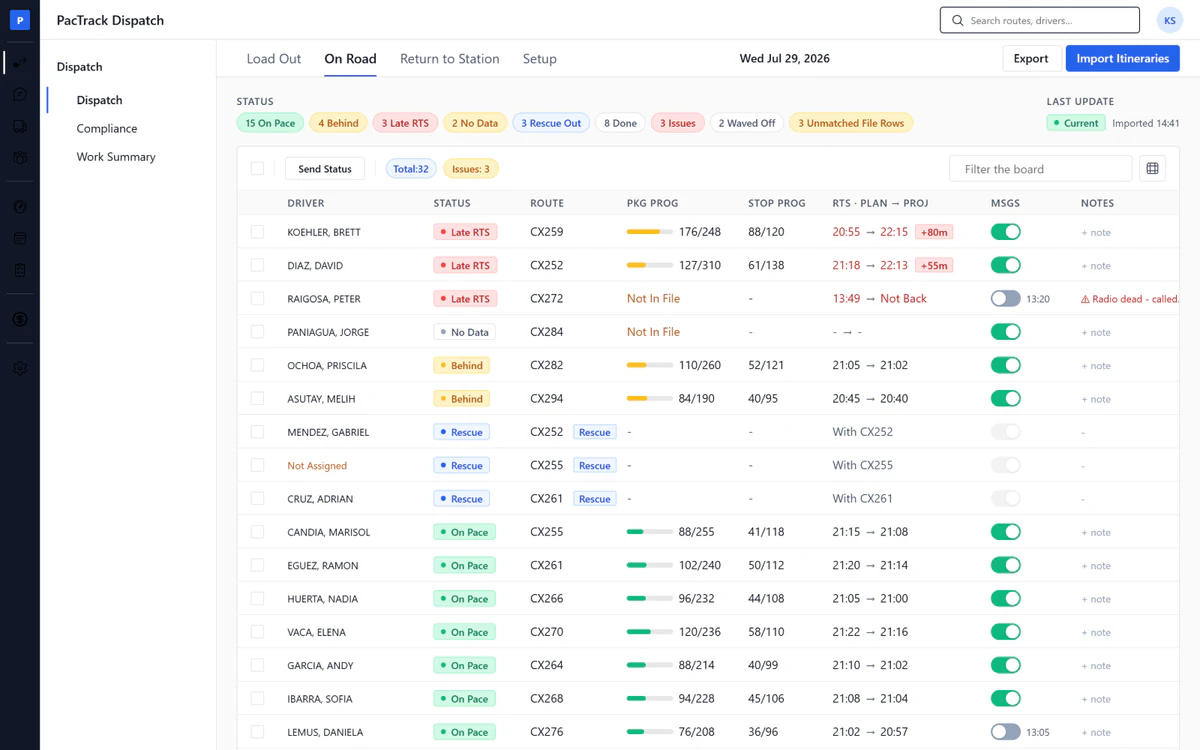
On Road
- ✓Behind check-in: One click texts every driver who is behind
- ✓Projected return: See who will be back late before they call you
- ✓Rescue management: Assign a rescue mid-route, both drivers get a text
- ✓Package and stop progress: Live counts from the Amazon itinerary
- ✓Wave-off pill: The time the driver left, shown on the row
- ✓Issue flags: A driver's problem noted now, seen at close
- ✓Itinerary import: Load the Amazon itinerary, the board fills itself
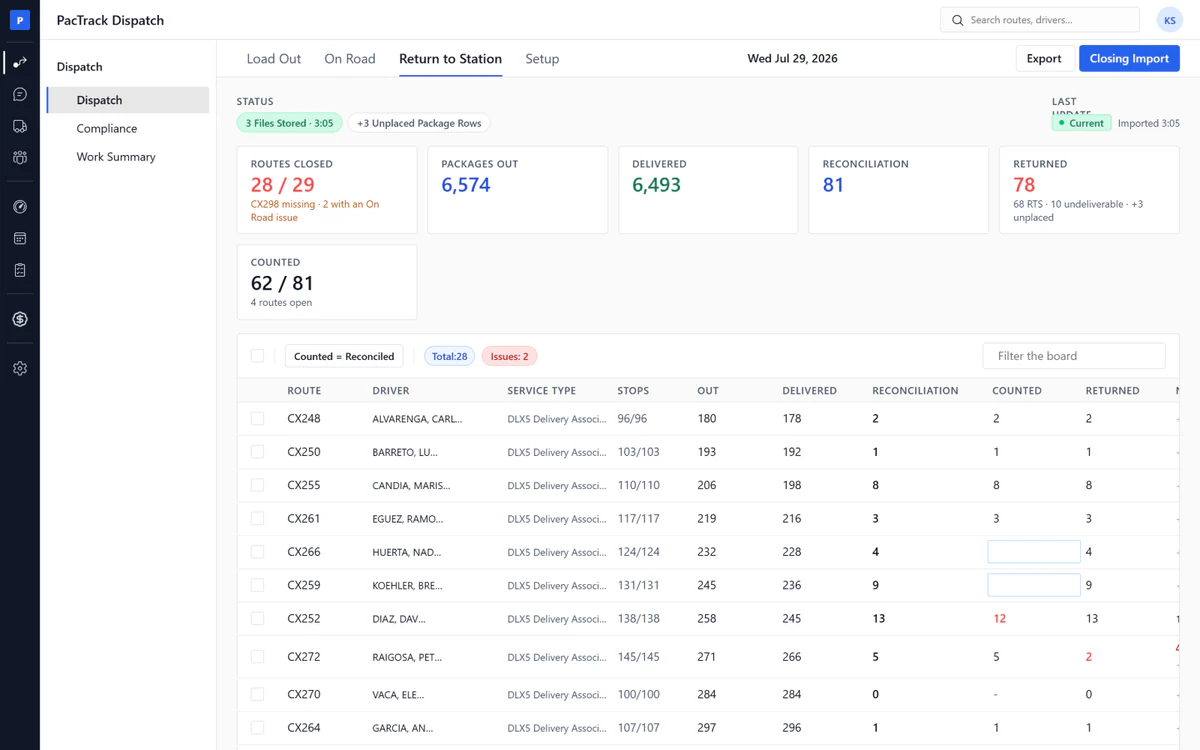
Return to Station
- ✓Package reconciliation: Packages out, delivered, counted and returned, per route
- ✓Lost package detection: A missing package shows tonight, not on the invoice
- ✓Never auto-corrected: The gap is shown, you decide what happened
- ✓Close and lock: Once closed, only an owner or manager can reopen
- ✓EOS report: The day's five numbers, DCR and the last driver in
- ✓Closing import: Load the Amazon Routes and Packages files
- ✓Export: CSV, XLSX or PDF
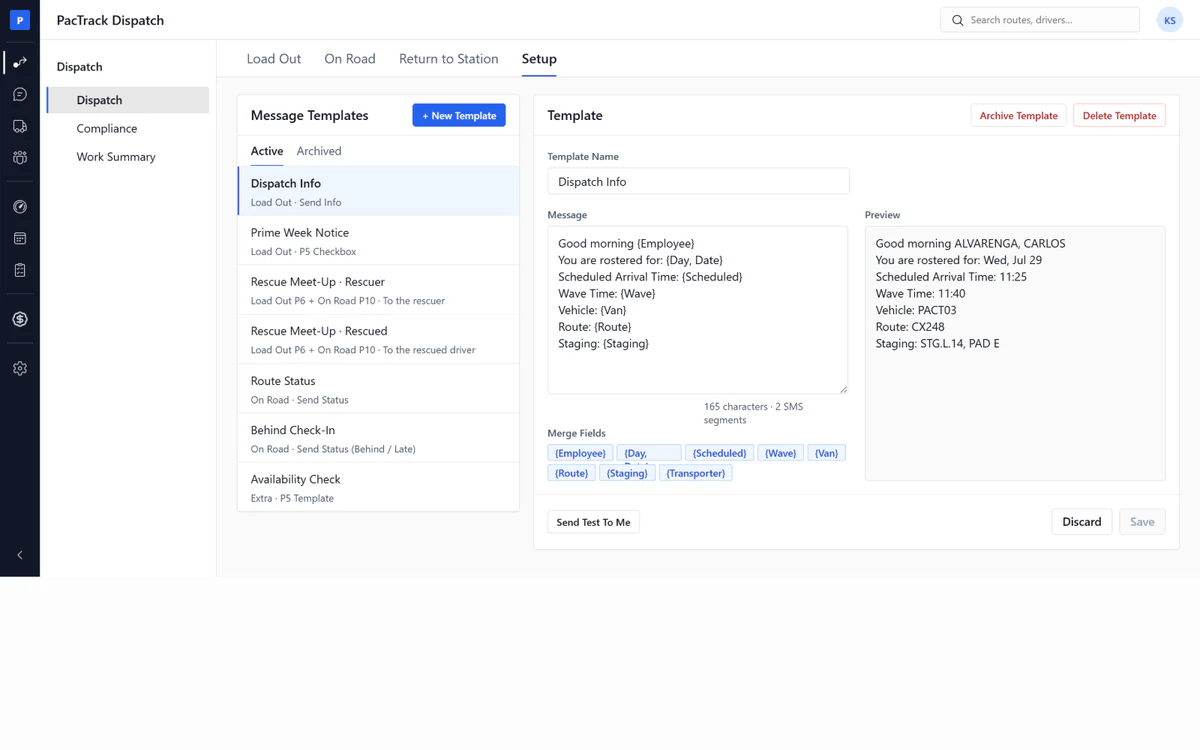
Setup
- ✓SMS templates: Every text Dispatch sends starts from a template
- ✓Send test to me: See the text on your phone before a driver does
- ✓Merge fields: Driver name, route and time fill in by themselves
- ✓Wave and sched offsets: Set the minutes once, every row follows
- ✓Ranked driver list: The order auto van assign uses for each van
- ✓Service types and staging: Your own route types and staging names
Compliance
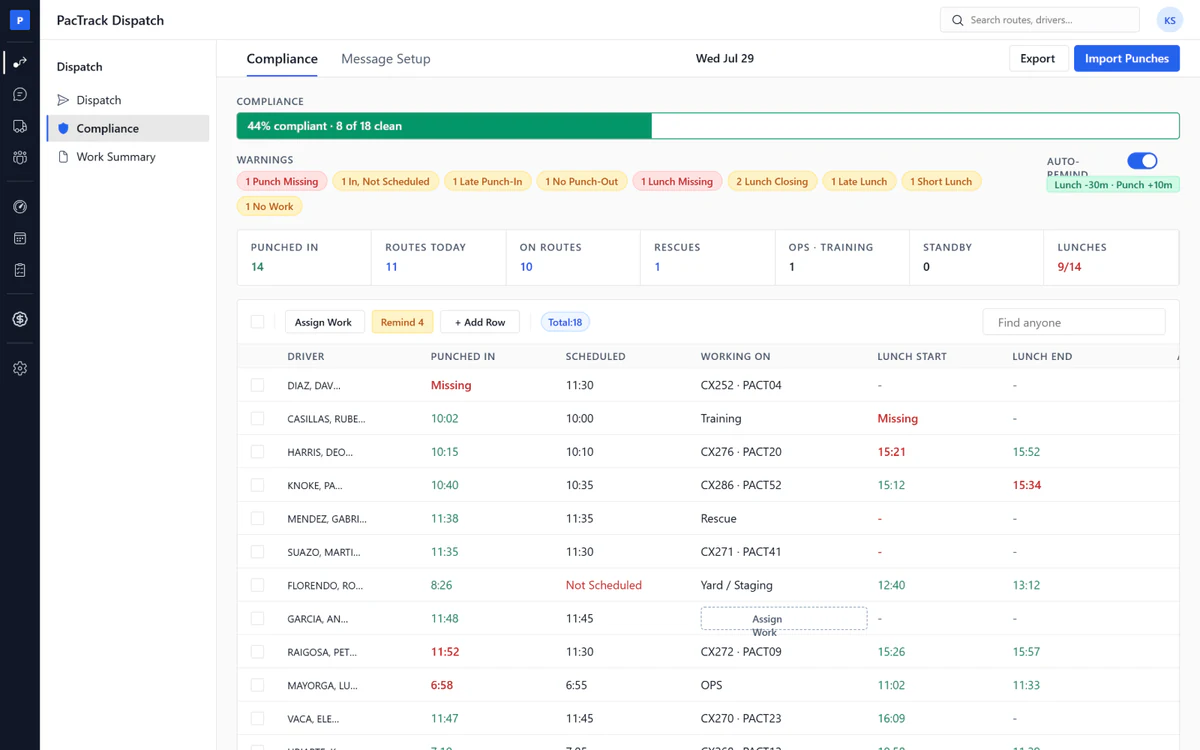
- ✓Punch and lunch reminders: A text to whoever is late, one per person per day
- ✓Punch board: Every punch next to the schedule, side by side
- ✓Late and short flags: Nine warning chips and seven counters, click to filter
- ✓Lead and grace minutes: You set how early and how late is allowed
- ✓Assign work: Give a job to anyone punched in but not scheduled
- ✓Logged to the inbox: Every reminder saved on the driver's timeline
- ✓Import punches: Load a punch file until the API is connected
Work Summary
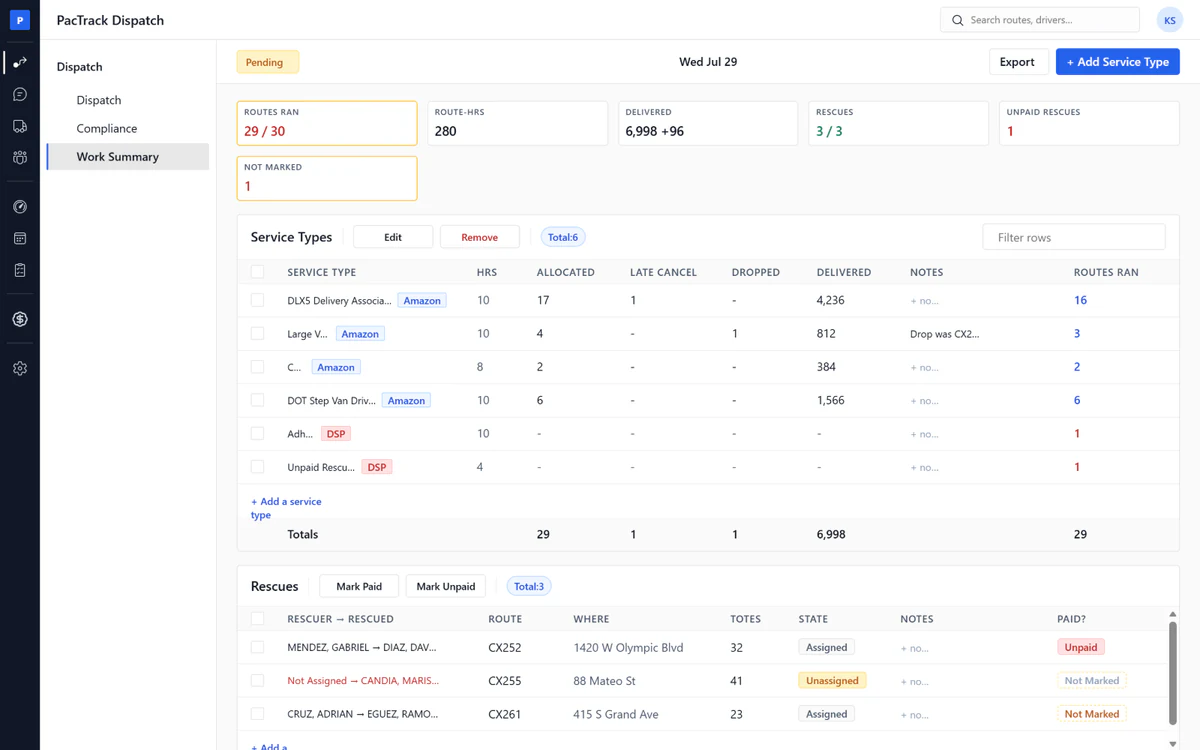
- ✓Unpaid rescue flags: Every rescue Amazon did not pay for, before the invoice
- ✓Payer split: Every row says Amazon pays or the DSP pays
- ✓Match with Amazon: Mark the day matched, Invoice Validation checks that week
- ✓Daily worked record: One row per route type per day
- ✓Routes ran and route hours: Counted for you, or typed if you need to
- ✓Service type registry: Your route types, their hours, who pays, which vans
- ✓Weekly export: CSV or XLSX
Scheduling
The problem1. Anyone can get a shift. Your best drivers and your worst get the same routes.2. The hours cap is checked by hand, or not at all.3. Overtime is found after it already happened.
The fix1. Performance-based scheduling: the best drivers on the Scorecard get shifts first.2. The hours cap is a hard rule, so nobody is booked into overtime.3. Overtime shows on the week grid before payroll, not after.
Schedule
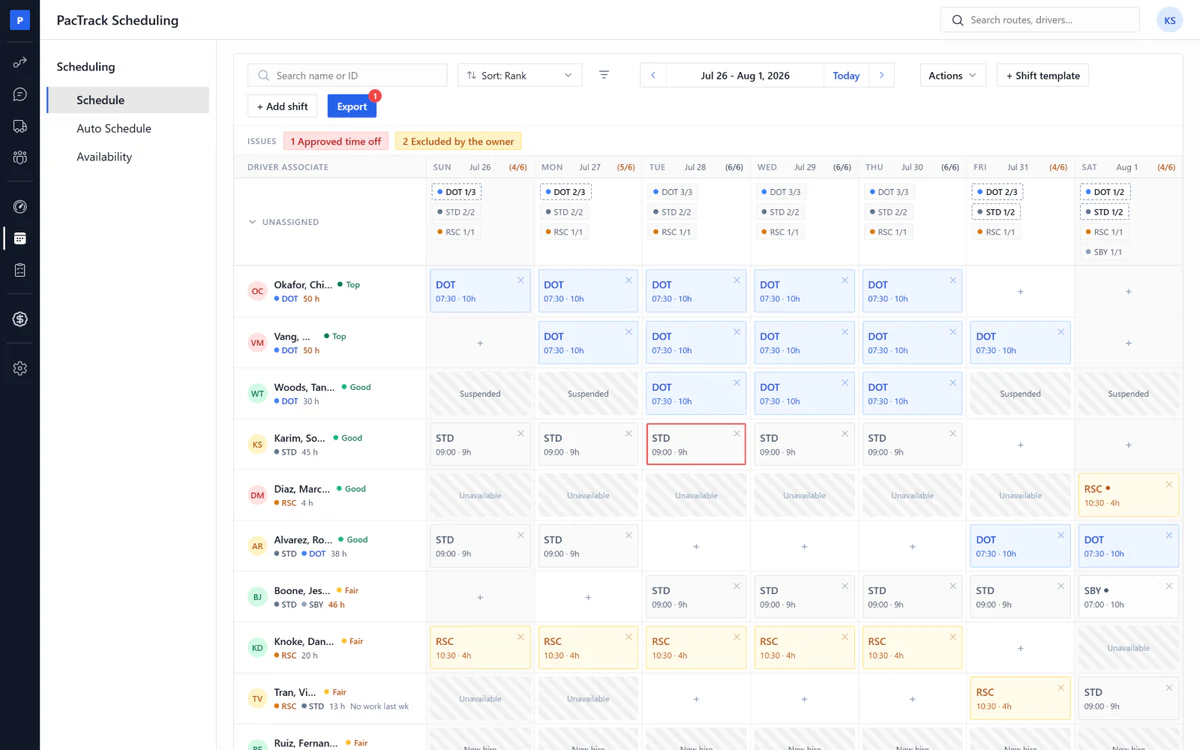
- ✓Hours cap: Over the cap is refused, not just warned
- ✓Overtime warning: You see it before payroll, not after
- ✓Live rule checks: Every manual change is checked as you make it
- ✓Issues bar: Every violation, click to see the driver
- ✓Week grid: Drag and drop drivers into shifts, coverage per day
- ✓Swap check: Both drivers checked before the swap goes in
- ✓Payroll export: A Paycom, ADP or CSV file
- ✓Re-export: Any time, any week, never locked
Auto Schedule
- ✓Performance-based scheduling: The best drivers get shifts first
- ✓Hours cap: No driver is ever drafted into overtime
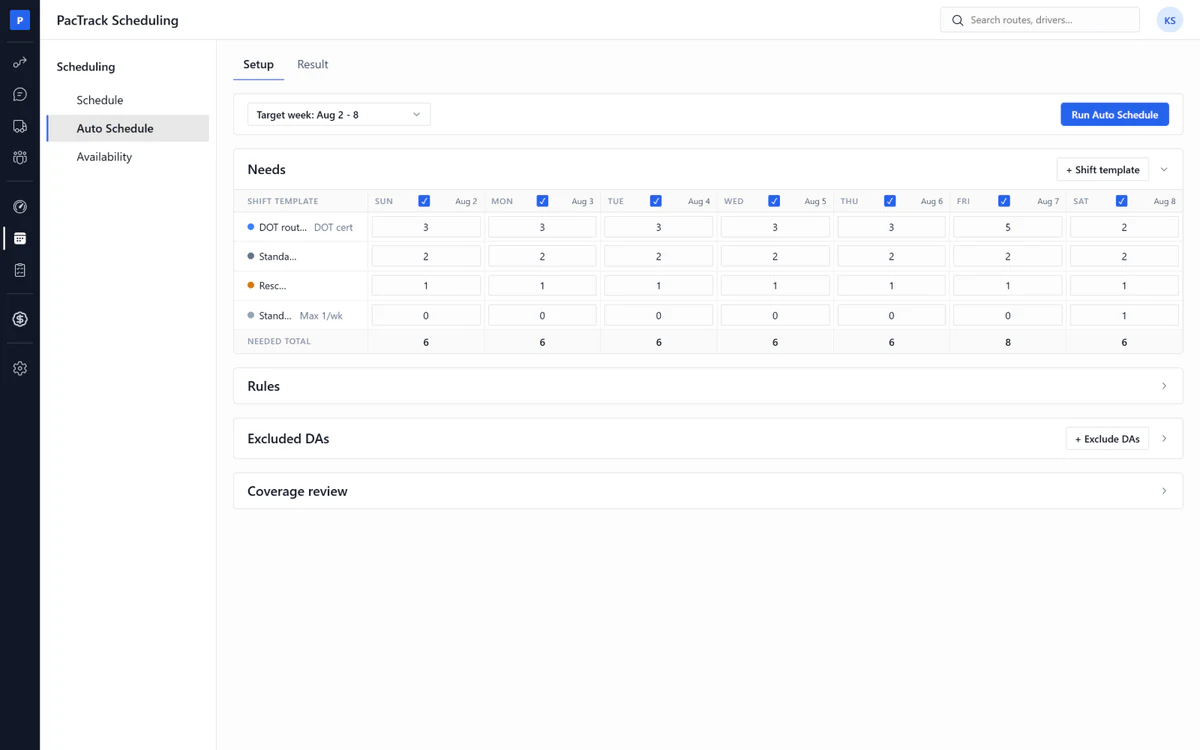
- ✓Auto schedule: Type how many drivers you need, the week drafts itself
- ✓Hard gates: Blocked coaching, approved time off, missing qualification
- ✓Decision trace: Why every driver was placed or skipped, per day
- ✓Needs matrix: Drivers needed per route type per day
- ✓Excluded drivers: New hires and suspended drivers sit out
- ✓Coverage review: See the gaps before you run
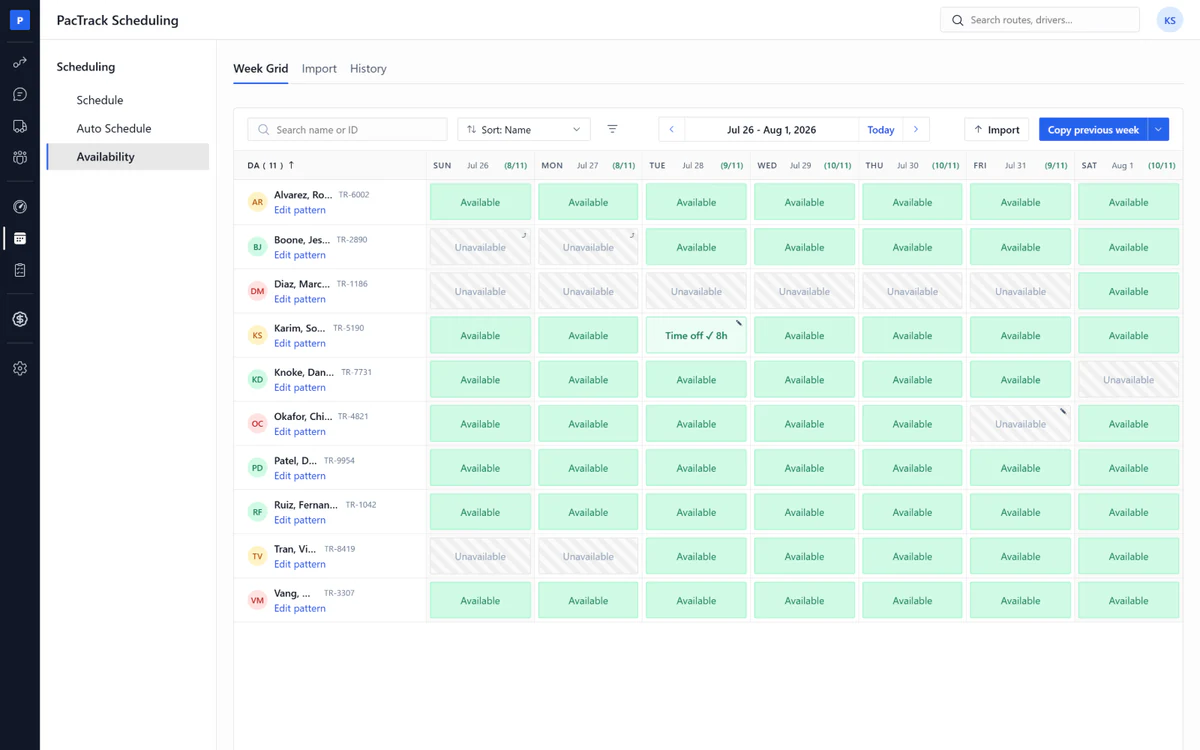
Availability
- ✓Approved time off: Always respected, never overridden
- ✓Availability: The manager sets each driver's weekly pattern
- ✓Per-week overrides: Change one week, keep the pattern
- ✓Capacity check: Drivers available versus drivers needed, per day
- ✓Time off hours: Eight a day, goes out to payroll
- ✓Import: Load an availability file or last week's schedule
Surveys
The problem1. You hear the problem when the driver quits.2. Nobody asks, because asking takes time.3. Amazon runs its own driver sentiment survey, and a bad score lands on you.
The fix1. Surveys fire when a route closes, or on your schedule.2. Named or anonymous, fixed on the survey.3. A survey never blocks a driver and never writes to their record.4. You ask first, so you hear it before Amazon does and fix it before their survey.
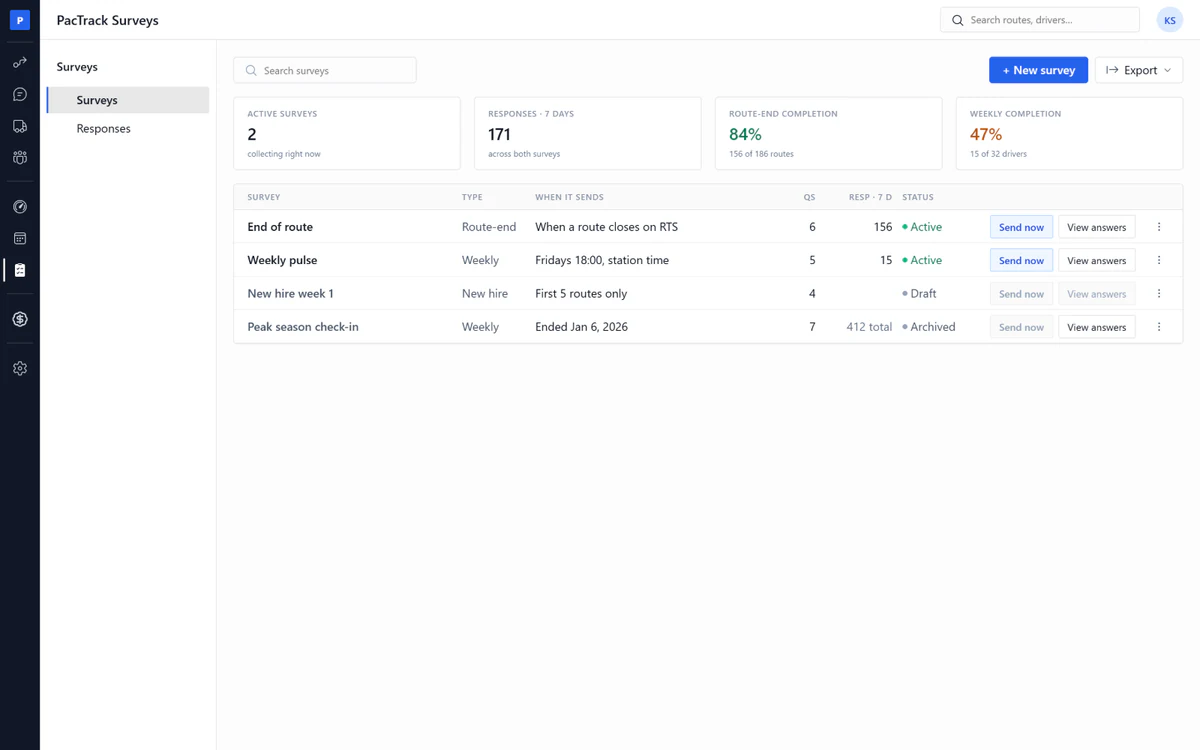
Surveys
- ✓Route-end trigger: The survey sends when the route closes
- ✓Weekly and new hire: Every Friday, or a new hire's first five routes
- ✓Anonymous mode: Answers come back with no name
- ✓Never blocks: A survey never stops a driver working
- ✓Send now: Pick the drivers, the button shows how many get it
- ✓Archive: The survey stops, the answers stay
Survey Maker
- ✓Templates: End of route, weekly pulse, new hire week 1
- ✓One click per question: No wizard, no steps
- ✓Seven answer kinds: Rating, yes/no, choice, text, photo, number
- ✓Driver preview: See it exactly as the driver will
- ✓One reminder: The next morning, or two days later
- ✓Required warning: Warns when more than half the questions are required
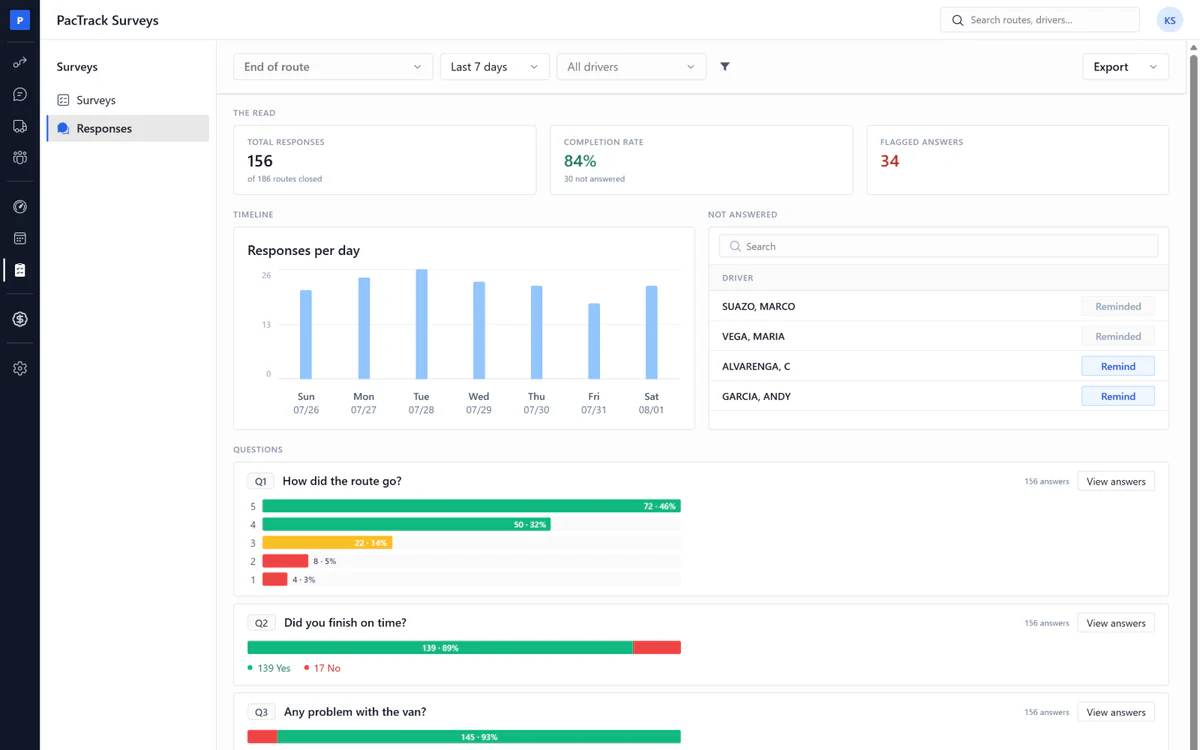
Responses
- ✓Flagged answers: Low ratings and problem answers, counted
- ✓Aggregates: Each question totaled, not each person
- ✓Their own words: Text answers shown exactly as typed
- ✓Anonymity floor: Results hidden until five drivers answer
- ✓Not answered: One reminder per driver, never a second
- ✓Log an event: A person decides, never the survey
- ✓Export: CSV or XLSX
Inbox & Dialer
The problem1. Drivers text managers' personal phones, or a different platform.2. Constant switching from portal to portal, or to the phone.3. You call a driver without the full picture of what they are doing.
The fix1. One DSP number. Every text and call goes through the portal.2. A dialer on every page, so you never leave the screen you are on.3. The rail shows the driver's route, score and shift status while you talk.
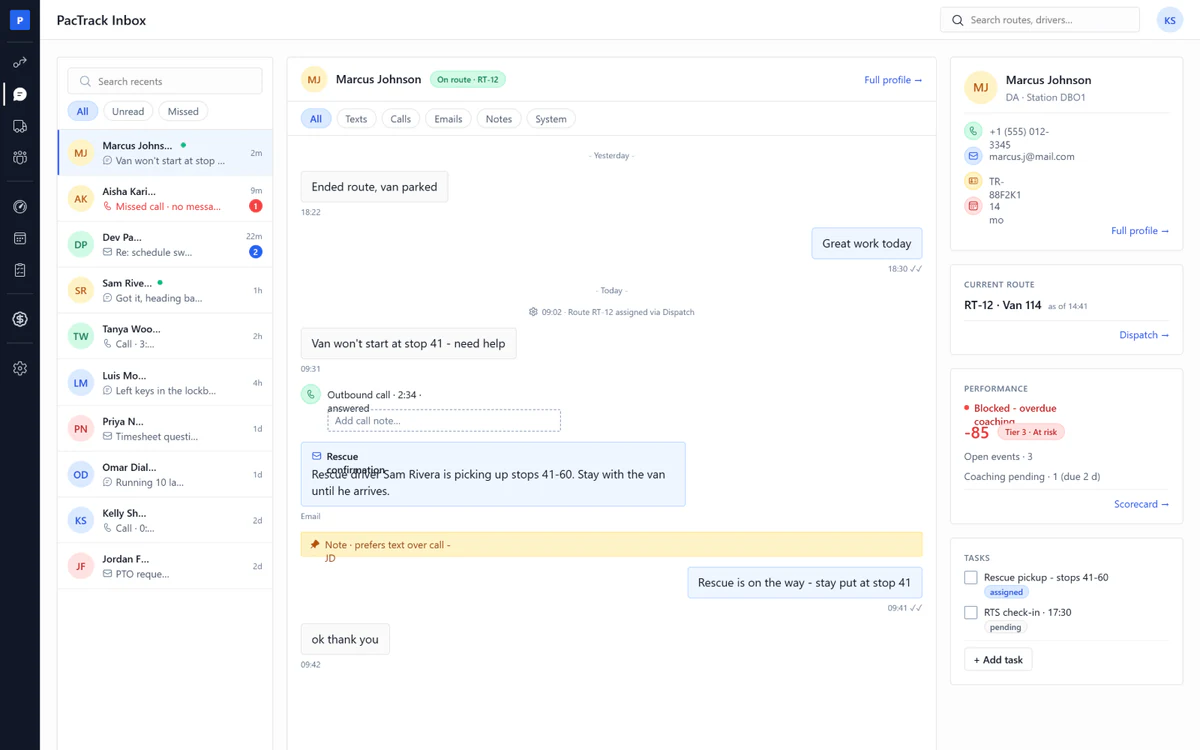
Inbox
- ✓One DSP number: Drivers text the DSP, not your managers' phones
- ✓Driver profile on the rail: Name, phone, ID and tenure while you talk
- ✓Current route: The route and van the driver is on right now
- ✓Performance: Net score, tier, open events and pending coaching
- ✓Shift gate on the rail: Clear to work or blocked, live
- ✓Tasks: What the driver owes today, tick them off from the rail
- ✓Timeline: Every text, call, email and note, per driver, in order
- ✓Missed calls: A red badge until someone handles it
Dialer
- ✓Floating dialer: A call button on every page of every portal
- ✓Call from a row: Click the driver, the call starts
- ✓DSP caller ID: The driver sees the DSP line, not a mobile
- ✓Call logging: Every call saved on the driver's timeline
- ✓Status: Set busy and the phone stops ringing for you
- ✓Transfer: Hand the call to a teammate
- ✓History: Your last 50 calls, tap to redial
- ✓Voicemail: Left on the DSP line, kept with the thread
Fleet
The problem1. Lease, insurance, repairs and the Amazon payment all sit in different places.2. Amazon's vehicle payment is never tied to a particular van.3. At the end of the month nobody knows which van made money and which van lost it.4. Vans keep standing in the yard and nobody counts the days.
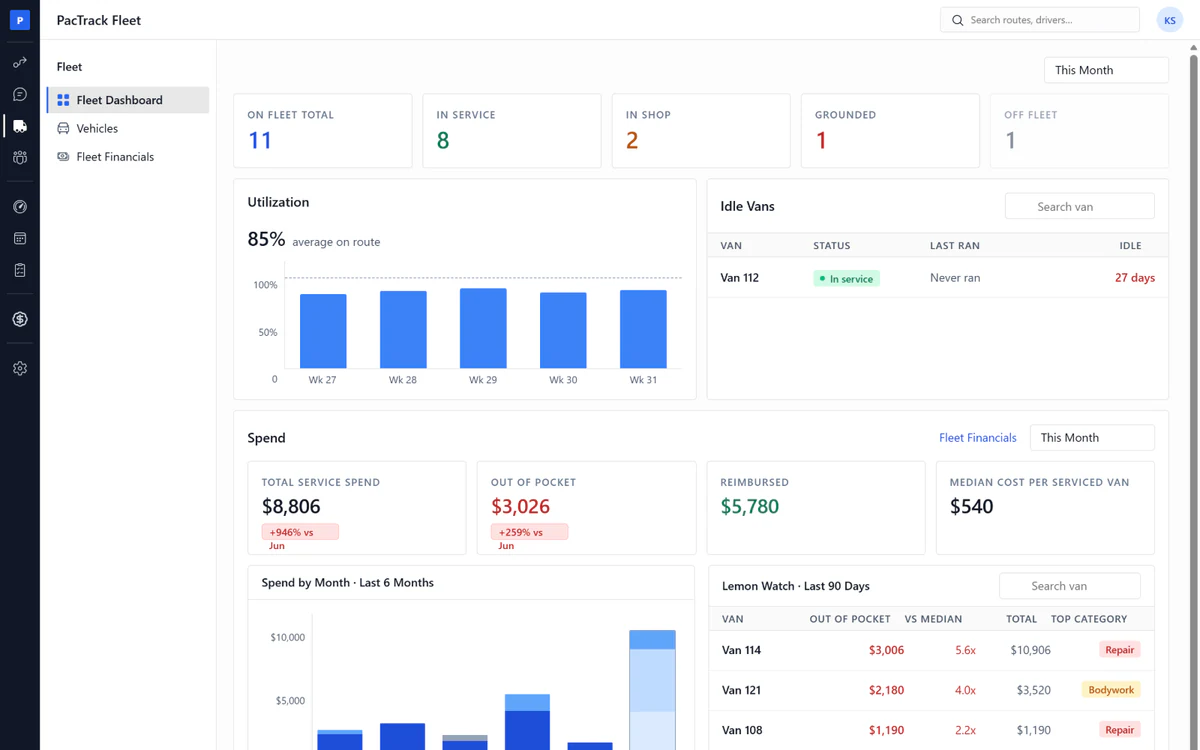
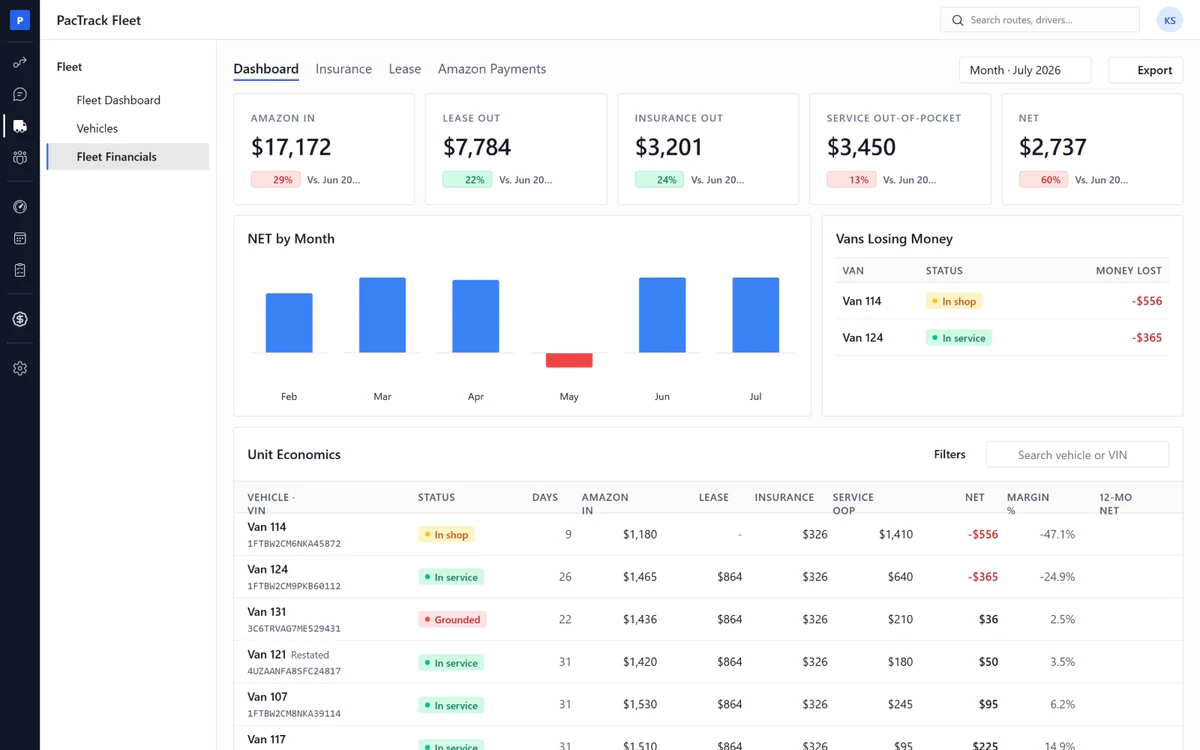
The fix1. Fleet Financials puts lease, insurance, repairs and the Amazon payment on one page, per van.2. Amazon's monthly vehicle payment is split per van, week by week.3. Net per van, per month, with a losing-vans list and Lemon watch naming the van eating your margin.4. The Fleet Dashboard shows which vans are on the road and which sat idle, today and the last seven days.
Fleet Dashboard
- ✓Utilization: How many vans are on the road right now
- ✓Idle vans: Which vans sat in the yard today
- ✓Lemon watch: The van costing twice the fleet's median in repairs
- ✓Spend: Out of pocket versus reimbursed, six months back
- ✓Needs attention: Which vans cannot roll today, and why
- ✓Status counts: In service, in shop, grounded
- ✓Renewals: Warned 30 days and 7 days before they lapse
- ✓Registration, inspection, permit, lease: Every date tracked
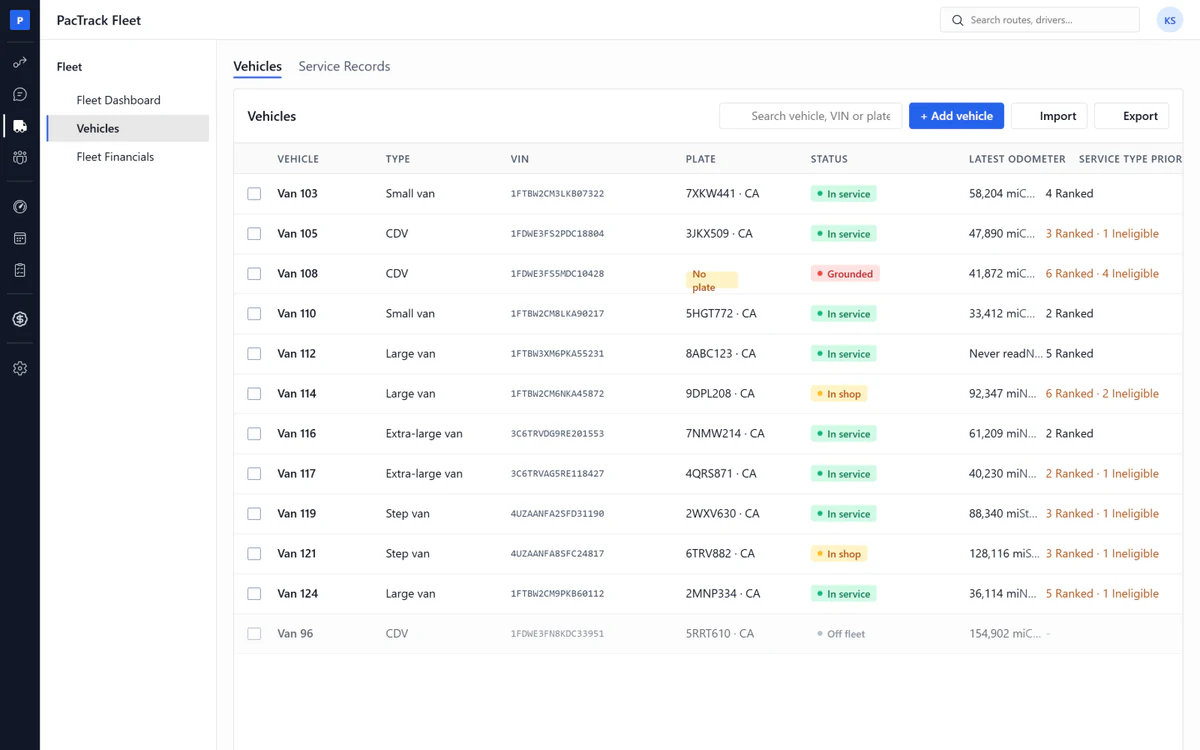
Vehicles
- ✓Service ledger: Every repair, its cost and who paid
- ✓Never deleted: Off fleet keeps the full history
- ✓Status lifecycle: In service, in shop, grounded, off fleet, with a reason
- ✓Incident records: Damage goes on the van, never on the driver
- ✓Odometer log: A reading can never go backwards
- ✓Photo sets: Compare two dates side by side
- ✓Ranked driver list: Which drivers get this van first
- ✓Vehicle import: Load your whole fleet from one file
Fleet Financials
- ✓Three money grids: Insurance, lease and Amazon payments per van
- ✓Amazon vehicle payment: Peak routes and vans paid, week by week
- ✓Net per van: Amazon pays in, less lease, insurance and repairs
- ✓Losing vans list: The vans losing money, ranked, every month
- ✓Six-month trend: Net per van, month by month
- ✓Import per tab: Load the insurer, lessor and Amazon files
- ✓Days in service: A thin month explained by days off the road
- ✓Restated marker: Any number changed after the month closed
General
The problem1. A driver's history is spread across Paycom, spreadsheets and texts.2. Their pay rate is in payroll, their events are in the Scorecard, their coaching is in a text thread.3. When a driver disputes something, there is no one record to pull.
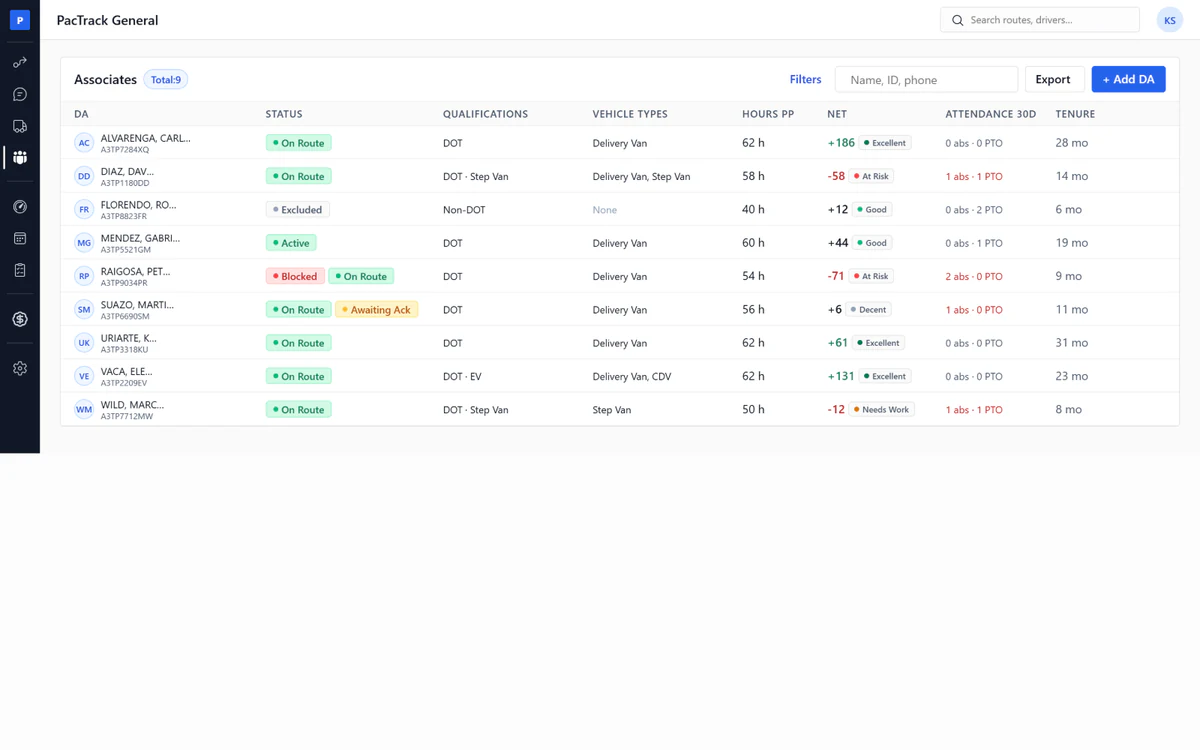
The fix1. One record per driver: schedule, performance, dispatch, timecard and documents in six tabs.2. Every number comes from the page that owns it, so nothing disagrees.3. Every coaching acknowledgment is kept as proof, and the whole record exports as Excel or PDF.
Associates
- ✓One driver record: Six tabs, everything about one driver
- ✓Documents: Every coaching acknowledgment kept as proof
- ✓Performance tab: Score, tier and every event
- ✓Schedule tab: Shifts against the hours cap
- ✓Timecard: Hours per day for the pay period
- ✓Dispatch tab: Today's route and van, live
- ✓Add or edit a driver: One form, hourly and overtime rates included
- ✓Ultimate DA: Invite to the app, give kudos, deactivate
Admin
The problem1. Everyone in the office sees everything, including the money.2. A driver calls at 6am and nobody knows who answers for what.3. Punch times sit in Paycom. Nobody in dispatch can see them.4. The tool carries someone else's name, so it feels like someone else's tool.
The fix1. Six posts: the dispatcher sees the day, Finance sees the money, nobody sees more than their job.2. Contacts is a list of reasons, each pointing at who answers, on the driver's phone.3. Punches come in through one connection, Paycom or ADP, and the day board reads them.4. Company & Station holds your company name, your logo and your colors, on the screens and on every export.
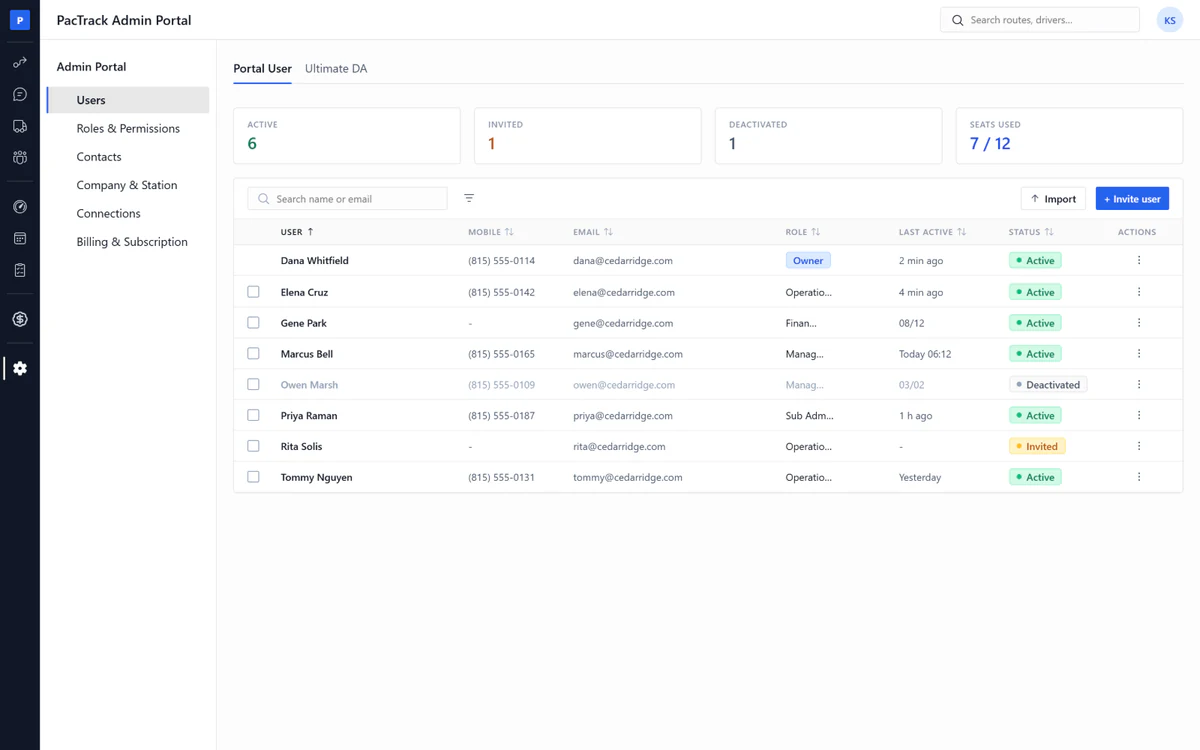
Users
- ✓Users: Invite office staff, activate, deactivate
- ✓Deactivate vs remove: Deactivate keeps the whole trail
- ✓Owner row: Nobody can remove or downgrade the owner
- ✓Ownership transfer: One step, the old owner becomes Sub Admin
- ✓Ultimate DA accounts: Unlimited driver accounts, never billed
- ✓Revoke app access: The driver keeps the account, loses your data
Roles
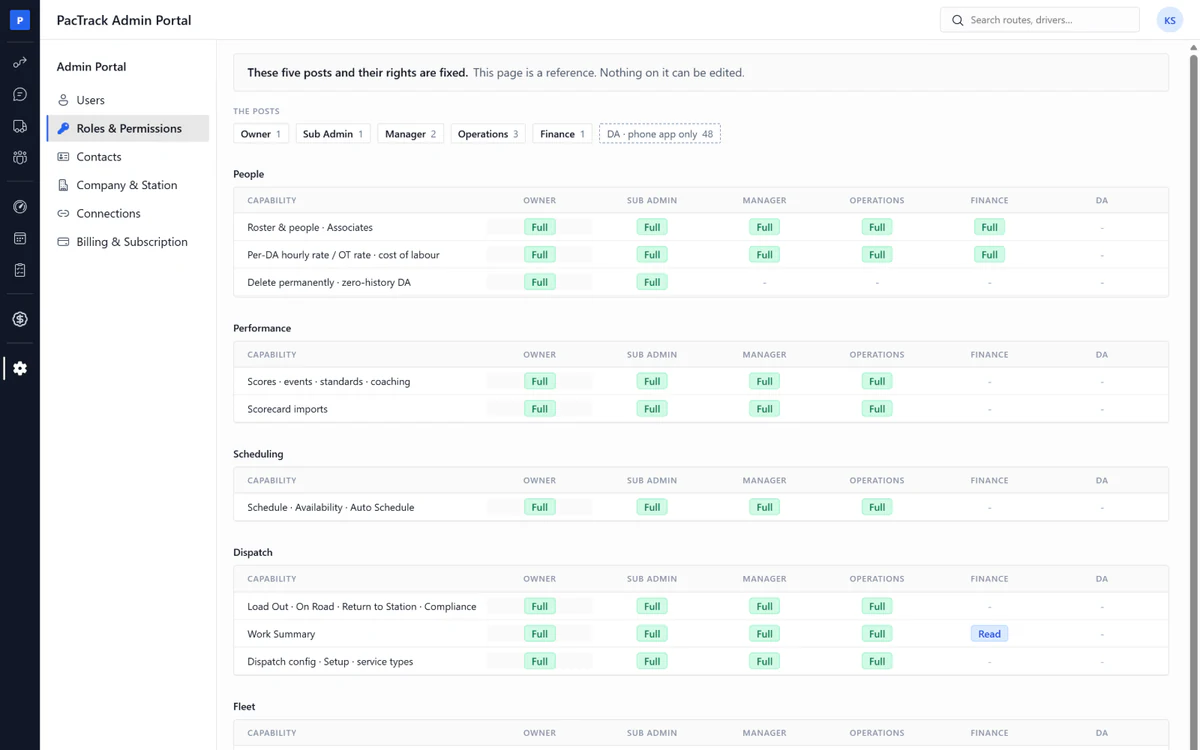
- ✓Roles and permissions: Six posts, from Owner to driver
- ✓Operations: The dispatcher post, sees no money pages
- ✓Finance: Sees the money and the driver record, not the day sheet
- ✓Capability matrix: What each post can do, fixed, nothing to set up
- ✓Hidden not greyed: A post never sees what it cannot use
- ✓Overlays: A popup opened from another page keeps that page's rights
Contacts
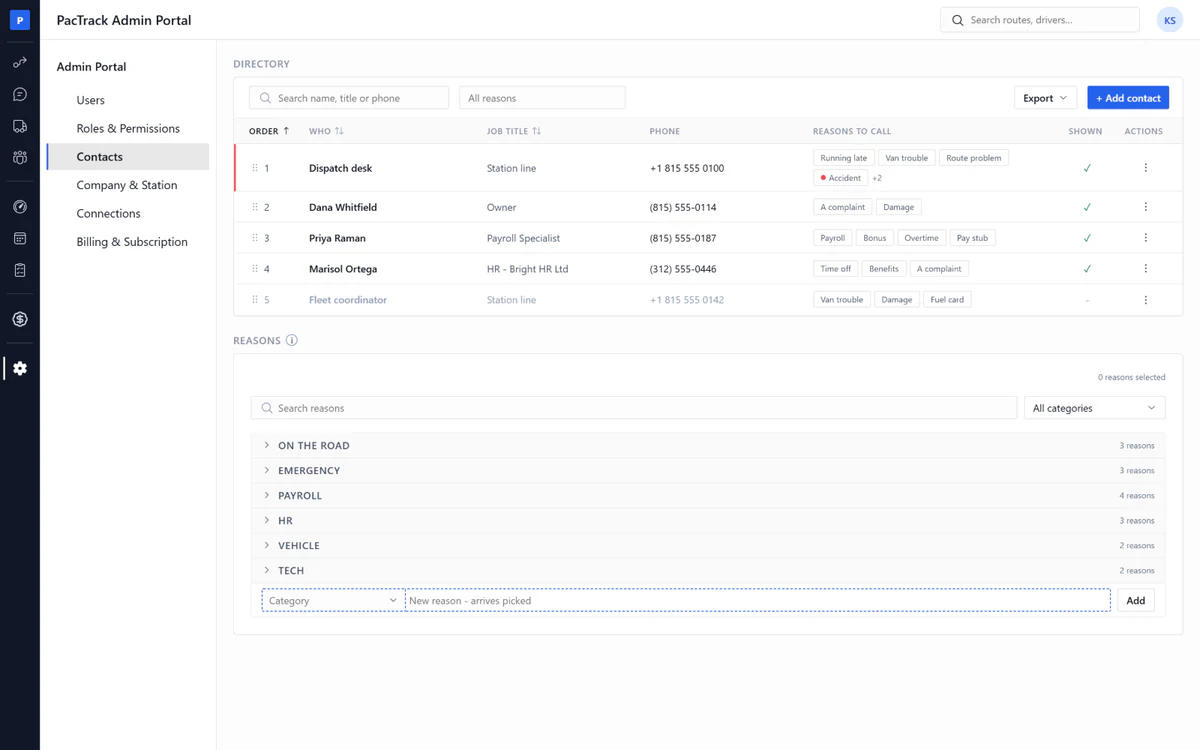
- ✓Contacts: A list of reasons to call, each pointing at a person
- ✓Driver help screen: The app's Help page is built from this list
- ✓Urgent pinned: Urgent reasons at the top of the driver's screen
- ✓Many-to-many: One person can answer for payroll, bonus and overtime
- ✓Job title: Free text, gives no access
- ✓Hide: Take a contact off the app, keep its place
Company & Station
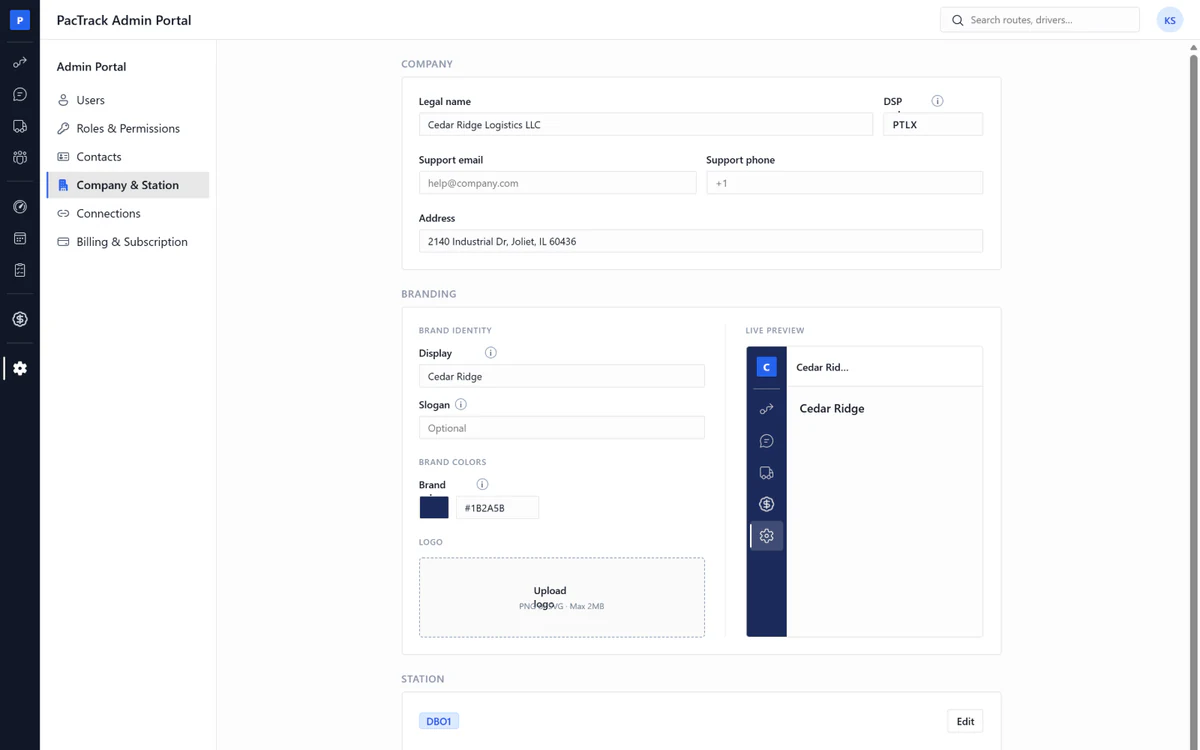
- ✓Company and station: Legal name, DSP code, station code, address
- ✓Logo: On exports and documents
- ✓One station: Every board covers the whole station
- ✓Time zone: Every time in the product shown in station time
- ✓Date, currency, distance: How numbers are displayed
Billing
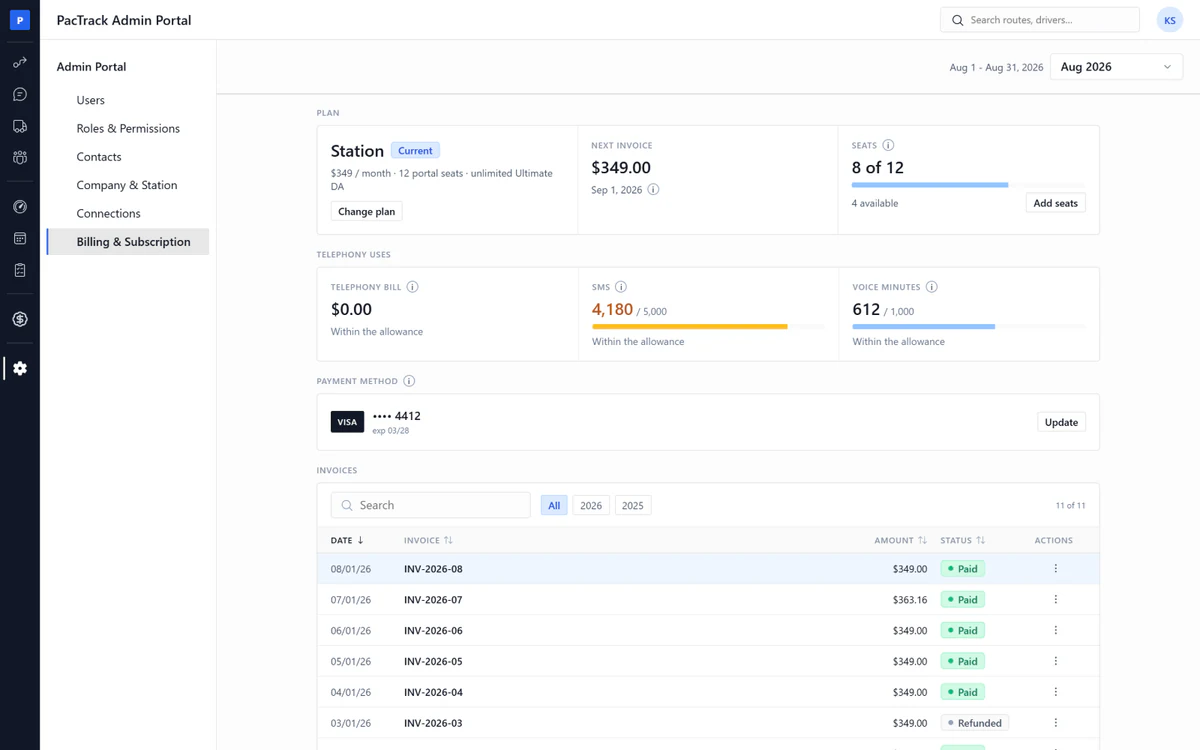
- ✓Billing: Your plan and the next charge
- ✓Usage meters: SMS, voice and storage, billed over, never cut off
- ✓Invoices: Every invoice as a PDF
- ✓Card on file: Entered with the card processor, never stored here
- ✓Failed payment: Read-only at day 14, nothing deleted
- ✓Cancel: Owner only
Connections
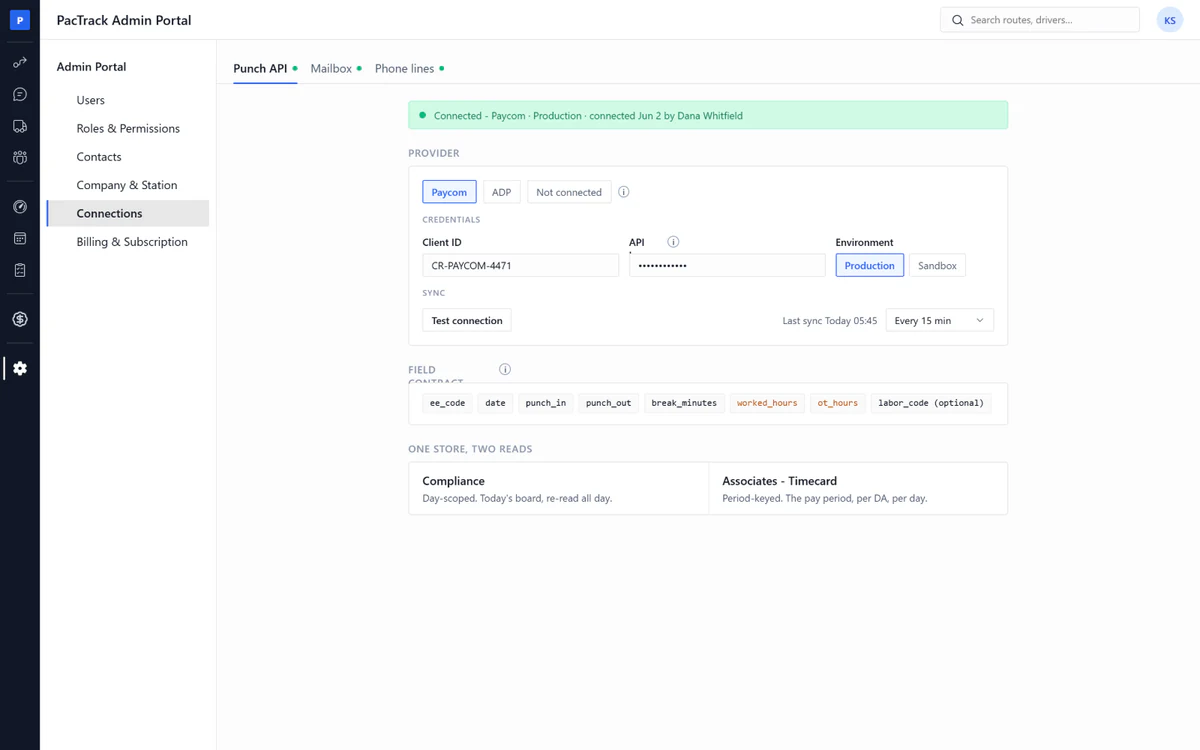
- ✓Punch API: Paycom or ADP, one punch source
- ✓File fallback: Punch times still land from a file until the API is on
- ✓Connections: Every link in and out of the product
- ✓DSP phone line: Every text and call goes out from this number
- ✓Ring group and voicemail: Who rings, and where a missed call lands
- ✓Mailbox: Connect email, and the Inbox email tab turns on
- ✓Test connection: Check it works, changes nothing
- ✓Dead connection: The page it feeds degrades, the day never stops
Ultimate DA driver app
The problem1. Someone finds the errors by hand and coaches over text.2. A text does not land. The driver does not read it.3. Drivers do not know where they stand.4. Collecting and keeping acknowledgments is tedious, so nobody keeps them.
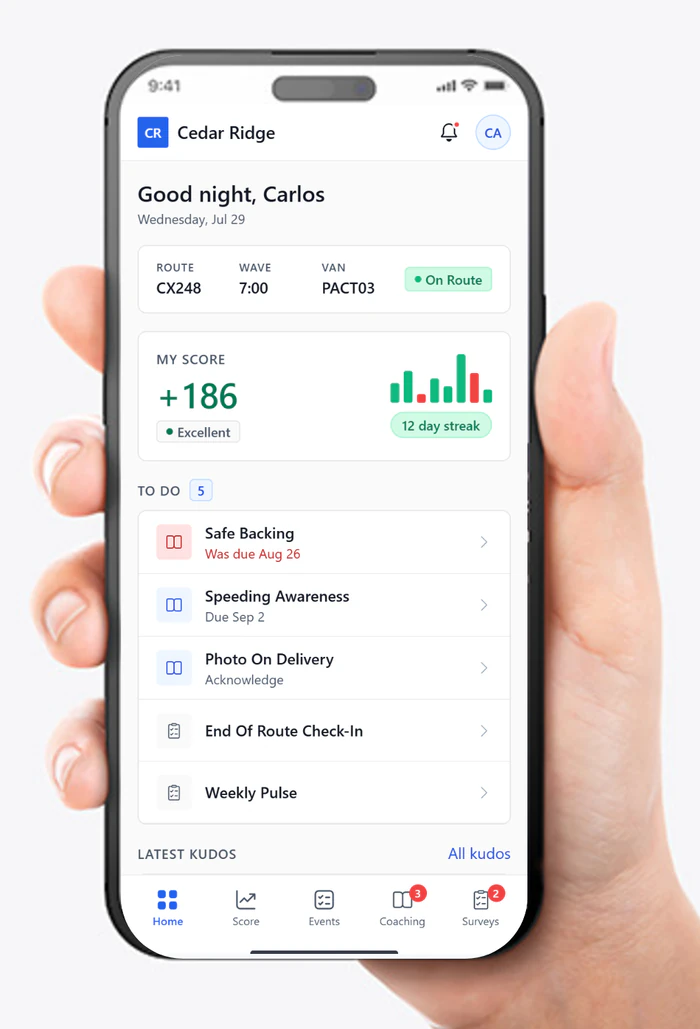
The fix1. Coaching assigns itself from the Scorecard event and lands on the driver's phone.2. The driver watches the video and passes the quiz on their own phone.3. Every driver sees their own score in the app, and nobody else's.4. The acknowledgment is one tap, recorded automatically with the date and time, and kept on the driver's file.
Ultimate DA
- ✓My Coaching: What coaching they owe, when it is due, and one tap to start it
- ✓Coaching Module: Watch the video, pass the quiz, acknowledge the standard
- ✓My Score: Their own score, and the events that built it
- ✓Profile: Their account, their job record, and every acknowledgment they ever made, kept for good
- ✓Home: Today at a glance: their company, their streak, how they are doing, and what is due
- ✓Notifications: Everything the station sent, and a tap opens it
- ✓Help: Pick a reason, see who answers, one tap to call
- ✓My Surveys: The surveys waiting for them, answered once from the phone
- ✓Take a Survey: Seven question types, one Submit, done
- ✓Video Library: Every company training video, browse and watch any time