How to coach every Amazon DSP driver, automatically.
Five steps that turn coaching from a text nobody opens into a video, a quiz and a recorded acknowledgment, assigned by the mistake itself and finished before the driver's next shift.
By Daniel Yadav · Published 13 September 2026
Why coaching does not stick
Most DSP coaching is a text, a quick word at the van or nothing at all. None of it proves the driver understood, and none of it leaves a record. Five gaps follow:
- Coaching is a text the driver never opens.
- Nobody can tell if the driver understood it.
- There is no record that the coaching happened.
- Coaching waits until a manager finds the mistake.
- Drivers put coaching off for days.
What good looks like
- Every kind of mistake has its own module: a video to explain it, a quiz to check it and an acknowledgment to record it.
- Coaching is assigned by the event itself, the moment it is imported or logged.
- Coaching due today is chased every morning, before drivers leave the station.
- Drivers with overdue coaching are not on the schedule.
- Every finished coaching has an acknowledgment on file, ready if a driver disputes it.
- Modules with low quiz scores are reworked every month.
The procedure
Five steps: one to set up, two every morning, one when a driver disputes coaching and one every month. Each step names who does it, how often and the page it runs on.
-
1
Give every kind of mistake its own video and quiz
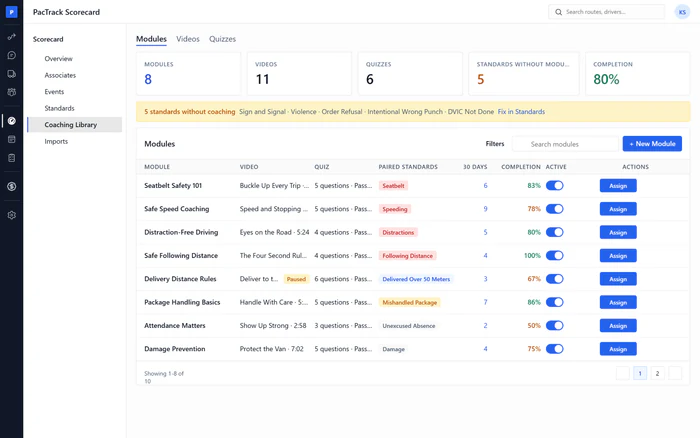
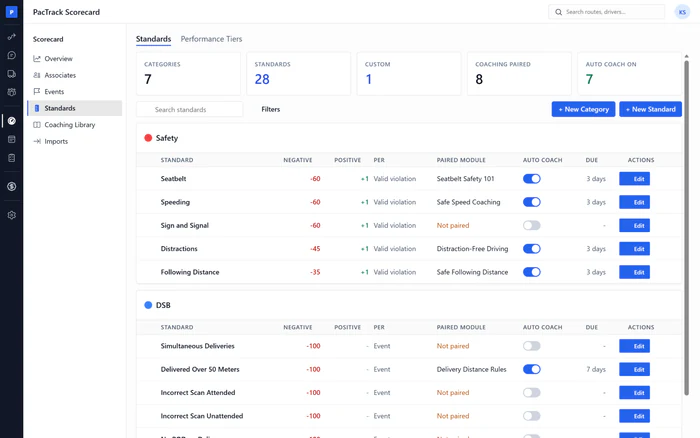
OnceWhere Scorecard · Coaching LibraryWho Owner or ManagerBuild one module for each mistake you score: a video that explains it and a quiz that checks the driver understood. Switch the module on, pair it with its standard and turn on auto coach, so the next mistake assigns the module by itself.
Done when: Standards Without Module reads zero, and every module you built is active and paired.
-
2
Chase coaching that is due today
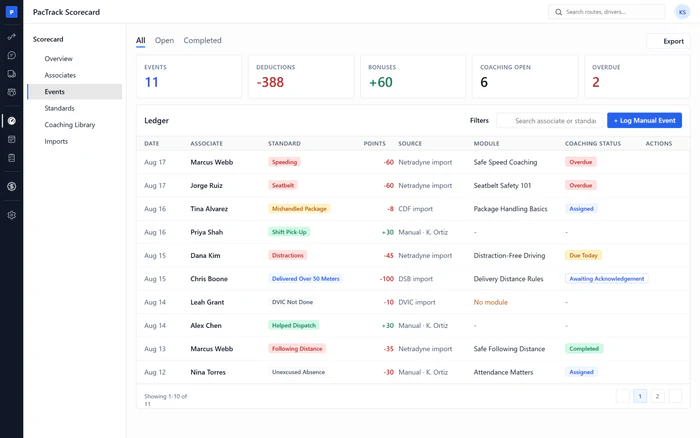
Every morningWhere Scorecard · EventsWho Manager or DispatcherEvery morning, open the Events chase list, filter to due today and awaiting acknowledgment, and remind or call each driver before they leave the station. A passed quiz is not finished coaching until the driver acknowledges it.
Done when: Every driver with coaching due today has been reminded, before the start-up meeting.
-
3
Keep drivers with overdue coaching off the schedule
Every morningWhere Scheduling · ScheduleWho Manager or DispatcherCheck Schedule for drivers marked Blocked. Remove any shift they still hold and give it to an eligible driver. New shifts and Auto Schedule runs already skip blocked drivers; this step catches shifts that were placed before the coaching went overdue.
Done when: No blocked driver holds a shift, and no hard issues are left on Schedule.
-
4
Pull the acknowledgment record when a driver disputes coaching
As neededWhere Scorecard · AssociatesWho Owner or ManagerWhen a driver says they were never told, open their performance detail and the Coaching and Acknowledgements card. The record shows the exact statement they confirmed, when they confirmed it, the quiz score and the event behind it. Export it before you reply.
Done when: You have the driver's acknowledgment record in front of you, or exported, before the conversation.
-
5
Rework modules with low quiz scores
MonthlyWhere Scorecard · Coaching LibraryWho Owner or ManagerOnce a month, compare each quiz's average score with its pass mark, and check which modules have low completion or a rising repeat rate. Rewrite confusing questions, replace a weak video and test again. Changes apply to future coaching only.
Done when: Every module with a low average score or a rising repeat rate has been reworked, or deliberately left as it is.
The three numbers to watch
Common mistakes
- Coaching by text message.
- Building modules and never switching them on.
- Closing coaching manually to save time.
- Leaving blocked drivers on shifts placed earlier.
- Answering a coaching dispute from memory.
- Never looking at quiz scores.