How to track Amazon DSP driver performance, day by day.
Five steps that move performance tracking from the weekly Scorecard PDF to a daily habit: your own standards, Amazon's files imported every day, coaching on every mistake and a morning read of who is slipping.
By Daniel Yadav · Published 13 September 2026
Why the weekly Scorecard is too late
Amazon's Scorecard arrives once a week and scores Amazon's metrics. By the time a DSP reads it, the mistakes behind it are days old and have often happened again. Five gaps follow:
- Driver results are checked once a week, on the Scorecard PDF.
- By the time the Scorecard lands, the mistake is a week old and has often happened again.
- Amazon scores its own metrics, not the standards you set for your drivers.
- Nobody sees who is slipping until the tier drops.
- Drivers do not know where they stand.
What good looks like
- Every rule you care about has points, for mistakes and for good work.
- Amazon's safety and quality files are imported every day, and every row becomes an event with points.
- Every mistake has a coaching module, and the coaching goes out the day the event is imported.
- The at-risk list and the biggest declines are read every morning.
- Drivers whose score is falling are coached every week, with the conversation on record.
- Drivers see their own score and events in Ultimate DA.
The procedure
Five steps: one to set up, three every day and one every week. Each step names who does it, how often and the page it runs on.
-
1
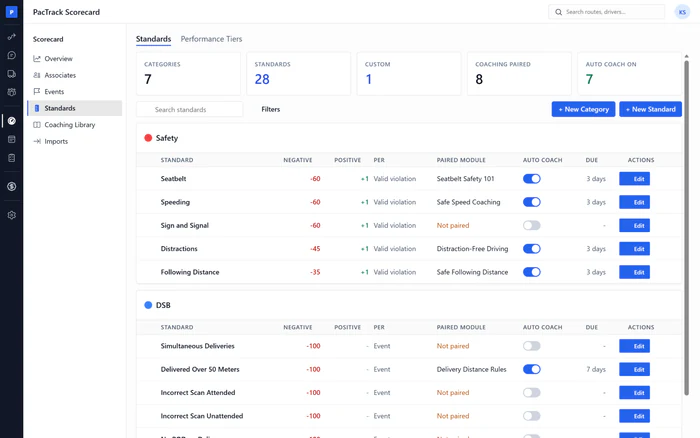
Set your own points for every mistake and every win
OnceWhere Scorecard · StandardsWho Owner or ManagerGo through the built-in standards and set the points for each mistake and each piece of good work you want to reward. Add your own rules for what Amazon does not score, and name the performance tiers, including the one that counts as at risk.
Done when: Every standard you use has points, and the tier ladder has names and an at-risk tier.
-
2
Import the day's Netradyne, DSB, CDF and DVIC files
DailyWhere Scorecard · ImportsWho Dispatcher or ManagerEvery day, download Amazon's safety and quality files and run each one through Imports with its saved preset. Every row becomes an event with points, and a mistake on a standard with a paired module starts its coaching the same second.
Done when: Each file's batch shows Done in History, and the ledger shows today's imported events.
-
3
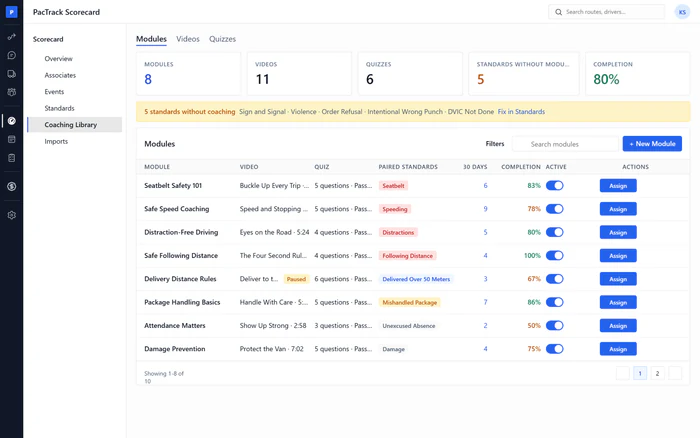
Check that every mistake has a coaching module
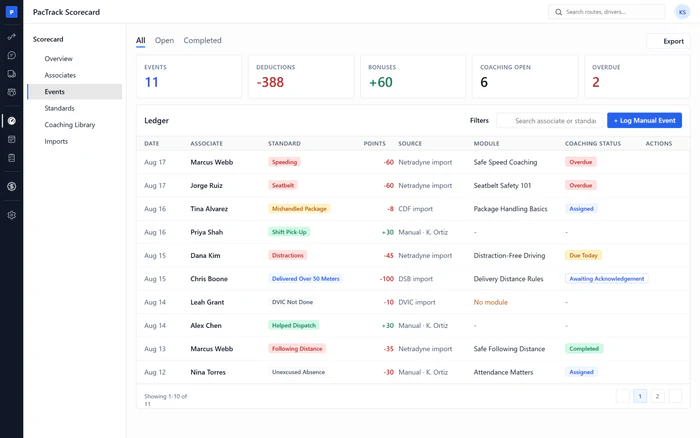
DailyWhere Scorecard · EventsWho Manager or DispatcherFilter the ledger to events with no coaching and look for mistakes that should have been coached. Assign a module to each one by hand, then pair its standard with a module so the next one coaches itself.
Done when: No deduction from today is left with No module, and every gap has its standard paired.
-
4
Check who is at risk and who is slipping
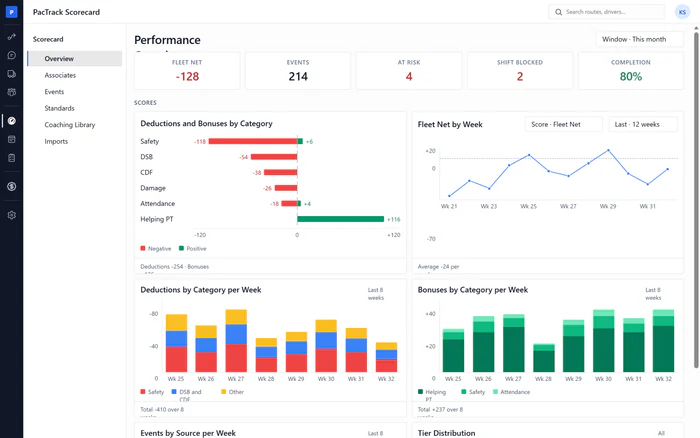
Every morningWhere Scorecard · OverviewWho Owner or ManagerOpen the Overview first thing. Read At Risk and Shift Blocked, then the At Risk card and Biggest Declines. These are the drivers to talk to today, before their scores show up on Amazon's Scorecard.
Done when: You have named today's at-risk and declining drivers, and each one has coaching assigned or a conversation planned.
-
5
Coach the drivers whose score is falling
WeeklyWhere Scorecard · OverviewWho Owner or ManagerOnce a week, set Biggest Declines to the week, assign coaching to each driver on it, log anything you saw yourself as an event, and talk to them. After the conversation, tick it on the Completed tab so the record shows it happened.
Done when: Every driver on the declines card has coaching assigned, and every conversation is ticked on the Completed tab.
The three numbers to watch
Common mistakes
- Waiting for the weekly Scorecard to review drivers.
- Running imports without resolving skipped rows.
- Leaving standards unpaired.
- Scoring only mistakes.
- Reading the at-risk list without acting on it.
- Changing points to react to one bad week.