How to catch at-risk drivers, before Amazon does.
Five steps for the drivers who do not want to perform: seen at the at-risk stage every morning, coached the same day, watched for repeats, given fewer shifts and decided on with the full record in hand.
By Daniel Yadav · Published 13 September 2026
Why problem drivers are found too late
Most DSPs find out a driver is a problem when Amazon does: a notice, a tier drop or a customer complaint. By then the pattern is weeks old. Five gaps let it grow:
- Drivers who do not want to perform hide in a long event list.
- You find out a driver is a problem when Amazon does.
- The same driver repeats the same mistake week after week.
- At-risk drivers still get the same shifts as your best.
- When it is time to decide, the record is scattered.
What good looks like
- Every at-risk driver is seen every morning, before the schedule is built.
- Every at-risk driver gets coaching or a conversation the same day.
- Repeat mistakes are reviewed every week.
- At-risk drivers fill the week last, and any driver held out has a written reason.
- Every decision is made with the full record: events, coaching, acknowledgments and trend.
- Drivers never see a tier or an at-risk flag. This list is for the owner and managers.
The procedure
Five steps: one every morning, one every day, two every week and one every month. The at-risk list is a management tool: drivers see only their own score and events in Ultimate DA, never a tier or an at-risk flag.
-
1
Check the at-risk list before you build the schedule
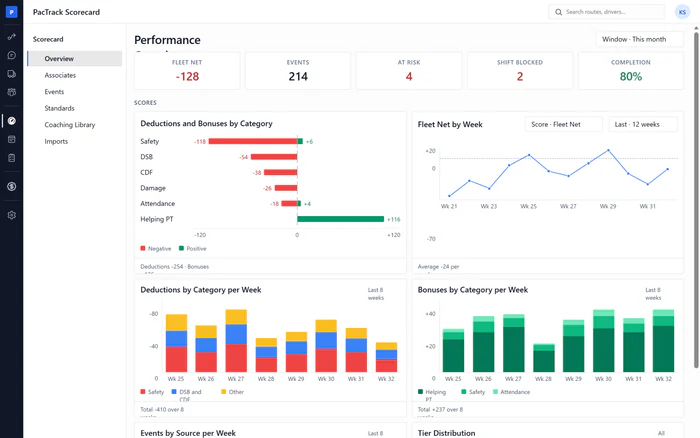
Every morningWhere Scorecard · AssociatesWho Owner or ManagerOpen the Overview for the at-risk count, then the Performance Roster with At Risk Only on. Read each driver's net score, trend, open coaching and eligibility, worst first. Know who they are before you touch the schedule.
Done when: You have read every at-risk driver's row, and each one has open coaching or a plan for today.
-
2
Coach every at-risk driver the same day
DailyWhere Scorecard · AssociatesWho Owner or ManagerFor every at-risk driver, log what you saw as an event if it is not already on record, and assign coaching with a due date. Then talk to the driver about the specific behavior, and write a note on their record.
Done when: Each at-risk driver has coaching assigned today and a note of the conversation.
-
3
Watch for the same mistake coming back
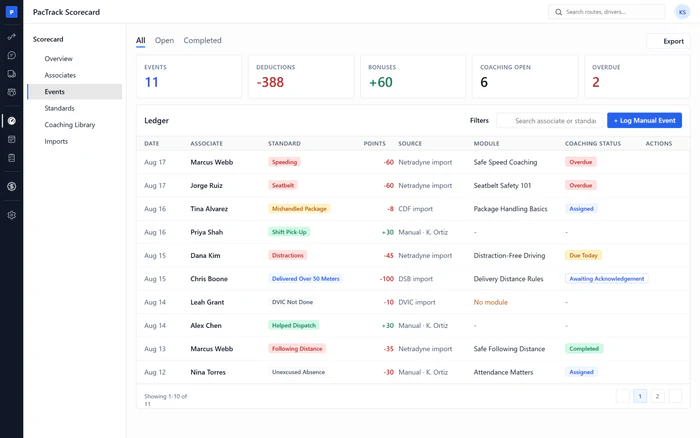
WeeklyWhere Scorecard · EventsWho Owner or ManagerOnce a week, open Events, Completed, and turn on Repeats Only. Every Repeat chip is a driver who broke the same standard within 30 days of finishing its coaching. Talk to each one, tick the conversation and change the approach, not just the module.
Done when: Every repeat driver has a ticked conversation and a new plan.
-
4
Give at-risk drivers fewer shifts until their score recovers
WeeklyWhere Scheduling · Auto ScheduleWho Owner or ManagerRun Auto Schedule ranked by Scorecard net score, so at-risk drivers fill the week last. If a driver needs to be held out, add them to Excluded DAs with a reason, and remove them when their score recovers. Ranking sets the order, not a cap, so check who still got shifts.
Done when: At-risk drivers sit at the bottom of the assignment log or under Below cut, and every driver held out has a written reason.
-
5
Decide on drivers who stay at risk, with their record in hand
MonthlyWhere Scorecard · AssociatesWho OwnerOnce a month, open each driver who stayed at risk and read their full record for the period: score trend, deductions by standard, events, coaching and acknowledgments. Export it, write the decision in a note and act: more coaching, hold them out of runs, or deactivate.
Done when: Every driver who stayed at risk has a written decision, backed by an exported record.
The three numbers to watch
Common mistakes
- Waiting for Amazon's notice to act.
- Assigning coaching without talking to the driver.
- Sending the same module again after a repeat.
- Expecting the ranking to cap shifts.
- Deciding on a driver from last week alone.
- Trying to delete a problem driver's record.